
To register for California State Unemployment Insurance (SUI), enroll in the EDD's e-Services for Business portal, select New Employer, complete the DE 1 registration form, and submit. You'll receive an eight-digit Employer Account Number (EAN) and a mailed UI tax rate notice. Online registrations process faster than mailed forms, which can take several days or longer.
Before you open a browser, confirm you have these on hand:
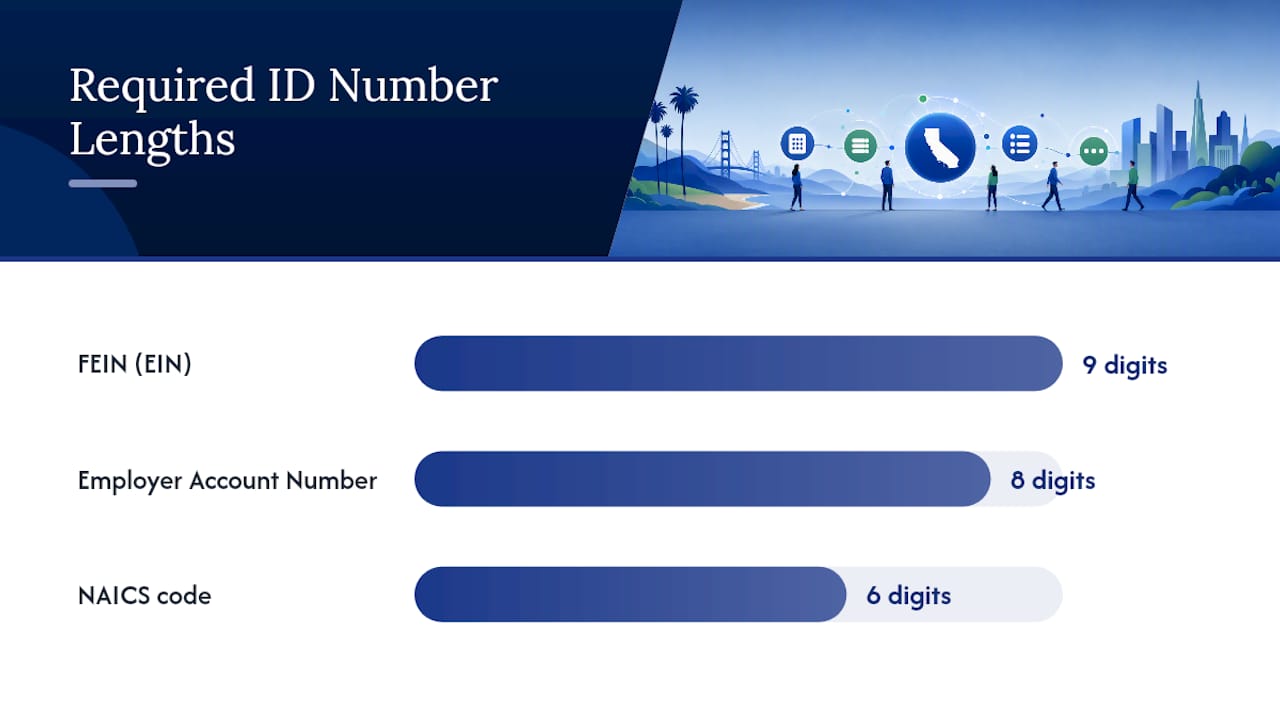
- Federal Employer Identification Number (FEIN): a nine-digit number issued by the IRS
- Legal business name exactly as registered with the California Secretary of State
- Secretary of State (SOS) ID number (if your entity type requires one)
- Date of first payroll and the names and Social Security Numbers of all responsible parties
- Valid business email address you can access immediately for the verification step with a strict time limit
The entire online enrollment and registration sequence typically takes under an hour when you have all documents ready. Your EAN arrives faster through e-Services than by mail.
Key Takeaways
Completing California SUI registration correctly requires a valid FEIN, an exact SOS name match, and a verified e-Services account before you can submit the DE 1 and receive your Employer Account Number.
| Point | Details |
|---|---|
| Register within 15 days | The EDD requires registration within 15 days of paying more than $100 in wages in a calendar quarter. |
| Verify email within 24 hours | Missing the e-Services email verification window forces a full restart of the enrollment process. |
| FEIN is required first | EDD cannot assign an EAN without a valid nine-digit FEIN; apply through the IRS before starting. |
| Online is faster than mail | Mail-in DE 1 forms (DE 1AG, DE 1HW, DE 1NP, DE 1GS) take 10–14 days or longer to process. |
| Glendale Payroll handles setup | Glendale Payroll completes EDD enrollment, DE 1 submission, and first filings for Greater Los Angeles employers. |
Table of Contents
- Do You Have to Register as an Employer in California?
- What to Gather Before You Start the Registration Process
- Step 1: How to Create Your EDD e-Services for Business Account
- Step 2: Register for Your Employer Payroll Tax Account
- Special employer types and what documentation they need
- After registration: what you need to file and pay
- How long does registration take, and how do you fix common problems?
- How Glendale Payroll helps with EDD registration and SUI compliance
- Are there fees to obtain an Employer Payroll Tax Account?
- Why careful registration matters more than most employers realize
- Glendale Payroll handles EDD registration so you don't have to start over
- Sources
Do You Have to Register as an Employer in California?
The legal trigger is straightforward: if you pay more than $100 in wages to one or more employees in a calendar quarter, you must register with the EDD. The clock starts on the day you make that payment, and you have 15 days from that date to complete registration. Missing that window exposes you to penalties and additional charges on unpaid payroll taxes.
A few common scenarios worth knowing:
- Household employers (nannies, housekeepers, caregivers) have a lower threshold. If you pay a certain higher threshold in cash wages to a household employee, registration is required.
- Agricultural employers face a separate threshold based on cash wages paid or the number of workers employed in a given period.
- Out-of-state employers with even one California-based employee must register, regardless of where the business is incorporated.
- Independent contractors do not trigger EDD registration on their own. The key distinction is the ABC test California uses to classify workers. Misclassifying an employee as a contractor does not eliminate the registration obligation.
Pro Tip: Register before your first payroll runs, not after. The 15-day window sounds generous, but payroll setup, bank account linking, and email verification all take time. Starting early prevents a last-minute scramble that leads to errors.
The California Office of the Small Business Advocate (CalOSBA) recommends treating EDD registration as part of a layered compliance sequence: form your entity, obtain federal IDs, secure local licenses, then register payroll accounts. Skipping steps out of order is the most common source of delays.
What to Gather Before You Start the Registration Process
Completing the DE 1 in one session saves you from losing progress or submitting incomplete data. Pull these together before you log in.
Required for all employers:
- Nine-digit FEIN (apply through the IRS EIN online application if you don't have one yet)
- Legal business name and any DBA (doing business as) name
- California Secretary of State ID number for corporations, LLCs, and LPs
- Physical business address and mailing address
- NAICS industry code (look yours up at census.gov/naics)
- Date you first paid wages in California
- Names, titles, and Social Security Numbers of all owners, officers, or responsible parties
- Business phone number and a valid email address you can verify within 24 hours
Useful but not always required:
- Prior EDD account numbers (if you've registered before under a different entity)
- Payroll software details and expected pay frequency
- Estimated number of employees and anticipated quarterly payroll amount
Your email address matters more than most employers expect. The e-Services enrollment system sends a verification link immediately after you submit your enrollment. If you don't click that link within 24 hours, the system cancels your session and you must restart from the beginning. Use an email you can access right away, not a shared inbox with delayed delivery.
For a broader look at your startup payroll tax obligations beyond SUI, the startup payroll tax guide from Glendale Payroll covers the full sequence from entity formation through first filing.
Step 1: How to Create Your EDD e-Services for Business Account
The outcome of this step is a verified e-Services account that gives you secure access to register for payroll taxes, file returns, and manage deposits going forward. EDD's e-Services for Business is the primary hub for all payroll tax management, and you cannot complete the New Employer registration without it.
- Go to e-Services for Business at edd.ca.gov.
- Select Enroll on the main screen.
- Enter your personal information (name, contact details) and create a username and password.
- Choose and answer your security questions.
- Submit the enrollment form.
- Open your email immediately and click the verification link EDD sends. You have 24 hours. If you miss that window, you must restart enrollment from step 1.
- Set up your second authentication factor (text message, phone call, or email code) when prompted.
- Log in with your new credentials and proceed to the payroll tax registration screen.
Warning: The 24-hour email verification deadline is firm. EDD's system does not extend it, and there is no way to recover a session that has expired. Verify your email before you close your browser or step away.
Pro Tip: If you are a bookkeeper, CPA, or payroll professional enrolling on behalf of a client, select the "Representative" option during enrollment rather than "Employer." This creates the correct access level and prevents account-type conflicts that can lock out the business owner later.
Step 2: Register for Your Employer Payroll Tax Account
Completing this step produces your eight-digit Employer Account Number (EAN) and triggers the assignment of your initial SUI tax rate. Online registration is processed faster than a mailed DE 1 form.
- After logging in to e-Services, select New Employer from the main menu.
- Review the New Registration information screen and confirm your entity type.
- Select "Click here to register for Employer Payroll Tax Account Number."
- Complete the DE 1 (Commercial Employer) sections in order: business type, FEIN, NAICS code, date of first payroll, and officer/owner information.
- Review all entries carefully before submitting. Name and FEIN mismatches are the most common cause of rejected applications.
- Submit the form. EDD will confirm receipt and begin processing.
The table below shows the key DE 1 fields, what to enter, and where to find each piece of information.
| DE 1 Field | What to Enter | Where to Find It |
|---|---|---|
| Legal Business Name | Exact name as filed with the California SOS | SOS entity search at bizfileonline.sos.ca.gov |
| FEIN | Nine-digit number, no dashes | IRS EIN confirmation letter |
| NAICS Code | Six-digit industry code | census.gov/naics or your SOS filing |
| Date First Wages Paid | Exact date of first California payroll | Your payroll records or bank statement |
| Officer/Owner SSN | Social Security Number of each responsible party | Personal records |
| Business Type | Corporation, LLC, sole proprietor, partnership, etc. | SOS filing or articles of incorporation |
Pro Tip: If your NAICS code doesn't appear in the EDD dropdown, search the Census Bureau's NAICS lookup tool first, then enter the closest matching code. If your SOS record shows a different business name than what you're entering, correct the SOS record before submitting the DE 1. A name mismatch between SOS and EDD is one of the most common reasons applications are returned.
Special employer types and what documentation they need
Not every employer follows the standard DE 1 path. Several categories require alternate forms or additional documentation, and mail-in submissions for these cases add processing time.
- Agricultural employers use Form DE 1AG. You'll need records showing cash wages paid and the number of workers employed in each quarter. The registration threshold differs from commercial employers.
- Household employers (domestic service) use Form DE 1HW. Attach documentation of wages paid to household workers. If you pay $750 or more in cash wages in a calendar quarter, registration is required.
- Nonprofit organizations use Form DE 1NP. Attach proof of federal tax-exempt status (IRS determination letter) and any California SOS nonprofit filings.
- Government entities use Form DE 1GS. Public agencies and school districts follow a separate registration path with different contribution requirements.
- Churches and religious orders have specific exemptions and may need to submit additional documentation to confirm their status before EDD assigns an account type.
- Foreign entities operating in California must first register with the California Secretary of State before completing EDD registration. SOS records must be current and match the name you enter in e-Services.
All alternate forms are available on the EDD payroll tax registration page. If your situation requires a mailed form, budget 10–14 days or more for processing, compared to the faster turnaround for online submissions.
After registration: what you need to file and pay
Once your EAN is assigned, you're responsible for four payroll taxes administered by the EDD: Unemployment Insurance (UI), Employment Training Tax (ETT), State Disability Insurance (SDI), and, where applicable, Voluntary Plan Disability Insurance (VPDI). Your initial UI tax rate arrives by mail after registration, separate from the EAN confirmation.
Key filing and deposit obligations:
- Quarterly wage reports (DE 9 and DE 9C) are due within one month after each calendar quarter ends.
- Payroll tax deposits follow a schedule based on your total payroll liability. Most new employers deposit quarterly, but larger payrolls may trigger monthly or semi-weekly schedules.
- New hire reporting is required within 20 days of each new employee's start date.
- Annual reconciliation confirms that your quarterly deposits match your total annual liability.
Your payroll tax deposit schedule determines exactly when each payment is due, and missing a deposit deadline triggers penalties that compound quickly.
Pro Tip: Link your bank account in e-Services immediately after receiving your EAN. Setting up electronic funds transfer (EFT) for deposits removes the risk of a lost check or a missed deadline. Automate the first deposit as soon as your first wage report is due, and reconcile it against your payroll records before submitting. Discrepancies caught early cost far less to correct than those found during an audit.
The e-Services portal gives you 24/7 access to file returns, make deposits, and update account information. Keeping your contact details current in the portal is not optional. EDD mails rate notices and compliance alerts to the address on file, and an outdated address means you miss them.
For ongoing planning around deposit timing and cash flow, payroll tax planning guidance for small business owners covers how to budget for quarterly obligations before they come due.
How long does registration take, and how do you fix common problems?
The e-Services enrollment and DE 1 submission together typically take under an hour when your documents are ready. EDD processes online registrations faster than mailed forms, which can take several days or longer. Your EAN and initial UI tax rate notice arrive by mail after EDD processes your application.
Common problems and how to fix them:
- Forgot to verify email within 24 hours: You must restart the e-Services enrollment from step 1. There is no recovery option. Use a personal email address you can access immediately.
- Business name mismatch between SOS and EDD: Correct the SOS record first at bizfileonline.sos.ca.gov, then re-enter the exact name in e-Services. Even minor differences (punctuation, abbreviations) cause rejections.
- Incorrect or missing FEIN: Contact the IRS to confirm your EIN before re-submitting. EDD cannot assign an EAN without a valid nine-digit FEIN.
- Missing officer SSNs: Gather all required Social Security Numbers before starting the DE 1. The form does not allow partial submission.
- EDD requests additional documents: Mail the requested items to the address on the EDD notice, include your confirmation number, and allow additional processing time. Respond within the timeframe stated on the notice.
What if your FEIN is still pending? If you've applied for an EIN but haven't received it yet, wait until the IRS issues your number before starting EDD registration. EDD requires a valid nine-digit FEIN to process your application. Applying for an EIN online through the IRS typically produces the number immediately upon completion.
How Glendale Payroll helps with EDD registration and SUI compliance
Glendale Payroll handles the full EDD registration sequence for California employers, including e-Services enrollment, DE 1 completion, and submission. For employers in Glendale, Burbank, Pasadena, and Greater Los Angeles, that means a dedicated payroll professional manages the process rather than a call center representative working from a script.
Specific services related to SUI registration and ongoing compliance:
- EDD account setup: Glendale Payroll completes the e-Services enrollment and DE 1 on your behalf, using your FEIN, SOS records, and officer information.
- Free payroll audit: Before onboarding, Glendale Payroll reviews your existing payroll setup to identify compliance gaps, including any missed registration obligations.
- First filings: After your EAN is assigned, Glendale Payroll handles your first quarterly wage report and deposit, reconciled against your payroll records.
- Ongoing deposit and reporting management: Monthly flat-rate service covers recurring DE 9/DE 9C filings, tax deposits, and new hire reporting.
- Rate monitoring: When your UI tax rate notice arrives, Glendale Payroll reviews it for accuracy and flags any discrepancies.
What you supply: your FEIN, SOS ID, officer SSNs, first payroll date, and a signed authorization. Glendale Payroll handles the rest.
A thorough payroll process review before registration catches classification errors and missing documentation that would otherwise delay your EAN.
Are there fees to obtain an Employer Payroll Tax Account?
Registering for an EDD Employer Payroll Tax Account through e-Services carries no government filing fee. The EDD does not charge employers to obtain an EAN or to enroll in e-Services for Business. Similarly, applying for a Federal EIN through the IRS online application is free.
What does cost money is non-compliance. Late registration penalties, interest on unpaid payroll tax deposits, and the cost of correcting misclassified workers add up quickly. Some employers also incur professional fees when they hire a payroll firm or CPA to complete the registration on their behalf, but those fees are a business decision rather than a government charge.
If your situation requires a mail-in form (DE 1AG, DE 1HW, DE 1NP, or DE 1GS), there is still no government filing fee. The added cost is time: mail-in processing takes several days or longer, which can push your first filing deadline closer than you'd like.
Why careful registration matters more than most employers realize
From Glendale Payroll's perspective, the two most costly mistakes in California payroll compliance are late registration and incorrect worker classification. Both are avoidable, and both tend to happen when employers treat EDD registration as an afterthought rather than a first step.
Late registration is not just a paperwork problem. Penalties accrue from the date you were required to register, not the date EDD discovers the gap. An employer who paid wages in January and registered in April has already accumulated months of exposure, even if no returns were filed late.
Worker classification is the subtler risk. Many small business owners in Greater Los Angeles operate with a mix of employees and contractors, and the California ABC test sets a high bar for contractor status. Registering correctly from the start, with the right entity type and the right worker classifications on your DE 1, prevents the kind of retroactive liability that surfaces during an EDD audit.
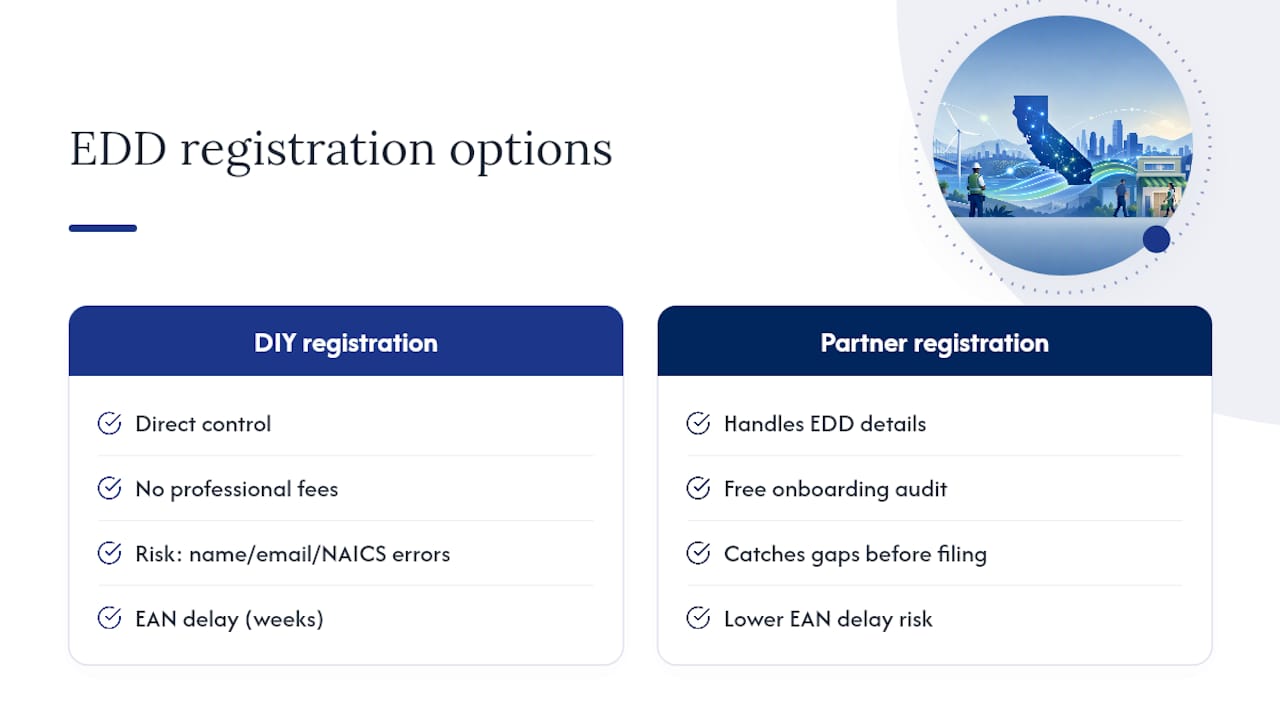
The tradeoff between DIY registration and partner-assisted registration is real. Doing it yourself gives you direct control and costs nothing in professional fees. But a single name mismatch, a missed email verification, or an incorrect NAICS code can delay your EAN by weeks. For a business running its first payroll, that delay creates a compliance gap on day one.
A payroll partner who knows the EDD process handles those details before they become problems. The free audit Glendale Payroll offers at onboarding is specifically designed to catch those gaps before your first filing is due.
Glendale Payroll handles EDD registration so you don't have to start over
California SUI registration has a short deadline, a strict email verification window, and several name-matching requirements that catch new employers off guard. Glendale Payroll's onboarding service covers the entire EDD registration sequence, from e-Services enrollment through your first quarterly filing, for a one-time setup fee.

For employers in Glendale, Burbank, Pasadena, and Greater Los Angeles, that means a dedicated payroll professional completes your DE 1, verifies your SOS records, and submits your registration accurately the first time. Your FEIN and officer data are handled securely, and you receive confirmation at each step. Ongoing monthly service covers all EDD filings, deposits, and new hire reporting after your EAN is assigned.
Start with a free payroll compliance review to identify any gaps before your first payroll runs. Or review payroll tips for California employers to see how Glendale Payroll structures ongoing compliance support. Ready to get started? Visit Glendalepayroll to schedule your onboarding.
Sources
- Step 3: Register for a Payroll Tax Account
- Starting a New Business in California (Secretary of State)
- Irs
This article is general information, not a substitute for advice from a qualified financial advisor. Consult a qualified financial professional about your own circumstances before acting on anything here.