
To enroll in EFTPS, go to Eftps and complete the business or trust enrollment form, or call EFTPS customer service to start by phone. You'll need your EIN, your exact IRS legal name and mailing address, and a U.S. bank routing and account number. Businesses and trusts still use EFTPS as their standard payment system; individuals face new restrictions, covered below. Your single next action: gather those four items, then click Enroll.
TL;DR:
- Enrollments must be completed with exact IRS-recorded business name, mailing address, EIN, and U.S. bank details to avoid delays and multiple PIN mailings.
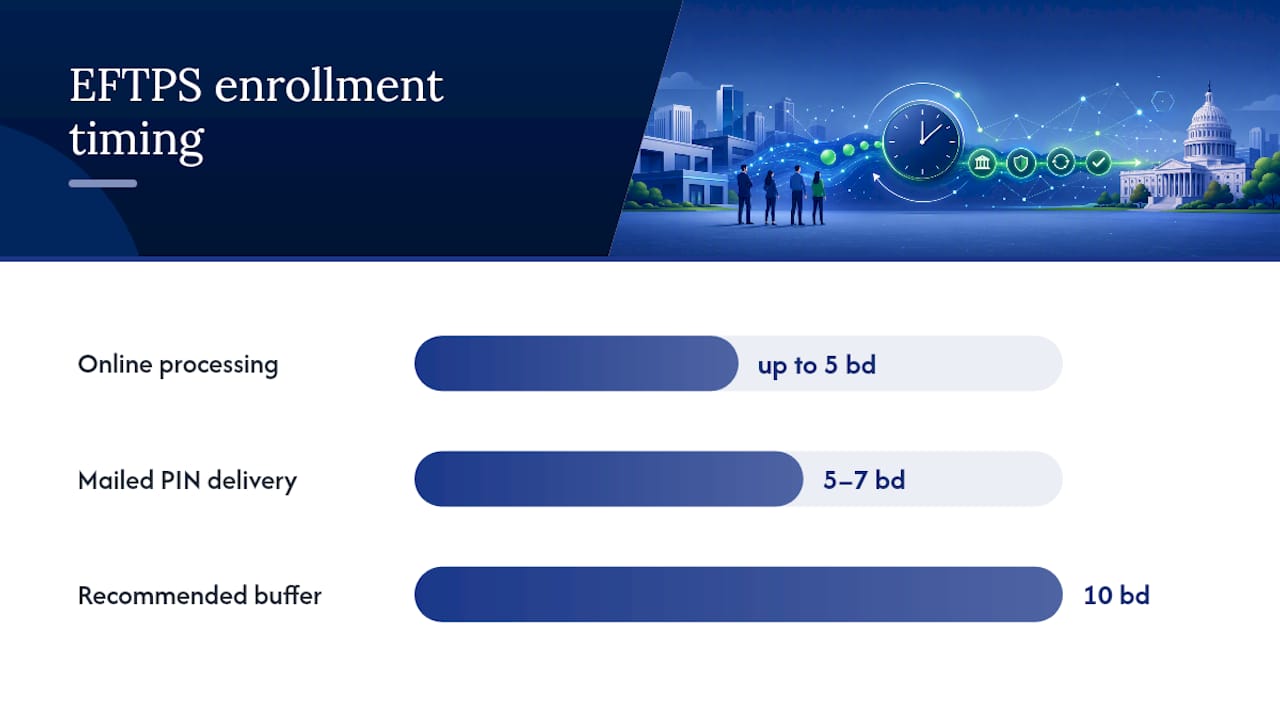
- Online EFTPS processing takes up to five business days, with an additional 5 to 7 days for mailed PINs, requiring a 10-day buffer before the first deposit deadline.
- Activating your PIN online without bank verification allows immediate payments but risks errors, while verification delays payments by up to 10 days.
- Individuals can no longer enroll in EFTPS after October 2025, with existing accounts remaining functional but new enrollments transitioning to alternate IRS payment methods.
- Payroll providers and businesses must formally authorize third-party payment handling, and scheduling routines should be clearly assigned and documented to prevent missed or duplicate deposits.
Table of Contents
- What You Need Before You Enroll in EFTPS
- How Do You Enroll in EFTPS Step by Step?
- Activating Your PIN and Making Your First Payment
- What Happened to EFTPS for Individuals?
- Batch Providers and Authorizing a Payroll Service
- Fixing Login Problems and Missing PINs
- Scheduling Recurring Deposits Without Missing a Deadline
- Why Enrollment Timing Is the Real Risk, Not the Paperwork
- Let Glendale Payroll Handle Your EFTPS Setup
- Sources
What You Need Before You Enroll in EFTPS
Missing or mismatched information is the top reason enrollment applications stall. The IRS cross-checks everything you submit against its own records, so precision matters more than speed here.
Before you start the EFTPS registration process, have these ready:
- EIN for businesses and trusts (sole proprietors enrolling as individuals use an SSN instead)
- Exact legal business name and mailing address, matching IRS records exactly, since your PIN mails to that address
- U.S. bank routing and account number, with one enrollment required per account you plan to use
- Primary contact name and phone number for the person managing tax payments
- A decision on who schedules payments, meaning your own staff or a third party authorized through Form 8655
Get the business name and address wrong and you're not looking at a quick fix. You're looking at a second mailed PIN and another wait.
How Do You Enroll in EFTPS Step by Step?
You have three enrollment paths: online, by phone, or on paper. Most businesses and trusts choose online because it's faster, but knowing all three keeps you from getting stuck if one channel isn't working.
- Go to Eftps and select "Enroll." Choose "Business" or "Trust," then fill in your EIN, legal name, address, and bank details exactly as they appear on IRS records.
- Submit the online form. The IRS processes new business enrollments in up to five business days.
- Prefer paper instead? Download Form 9779, fill it out, sign it, and mail it to the EFTPS Enrollment Processing Center address printed on the form.
- Wait for your mailed PIN. This arrives separately from your online submission and typically lands within 5 to 7 business days.
- Activate using the PIN and your EIN, either through the EFTPS voice response system by phone or directly on the website.
Timing checkpoint: Online enrollments generally process within five business days, but the mailed PIN adds another 5 to 7 business days on top of that. Build in a full 10 business day buffer before your first required deposit is due. If you're setting up EFTPS specifically to cover payroll tax deposits, that buffer isn't optional. A missed federal deposit deadline triggers penalties regardless of how good your excuse is.
One shortcut worth knowing: many businesses that recently received a new EIN are already pre-enrolled in EFTPS. If you got a PIN notice shortly after your EIN was assigned, activate it rather than starting a fresh enrollment. Duplicate enrollments waste time you don't have.
Activating Your PIN and Making Your First Payment
Once your PIN arrives, you have two ways to activate: call the EFTPS voice response system at 1-800-555-3453, or activate directly online using your PIN and EIN.
Here's where a real trade-off shows up. When you activate online, EFTPS asks whether you want to verify your bank account information first.
- Verifying your bank details delays your ability to make payments by 6 to 10 additional business days, but it confirms your routing and account numbers are correct before money moves.
- Skipping verification lets you make internet payments immediately, but a typo in your account number could send a payment to the wrong place.
Once you're active, scheduling a payment means selecting the tax form (Form 941 for quarterly payroll taxes is common), the tax period, and the amount. Every completed payment generates an EFT Acknowledgment Number. Save it.
Pro Tip: Screenshot or print your EFT Acknowledgment Number every time you schedule a payment. If the IRS ever questions whether a deposit was made on time, that number is your proof, and "I'm pretty sure I paid it" doesn't hold up during an audit.
What Happened to EFTPS for Individuals?
If you're an individual taxpayer rather than a business or trust, the rules changed recently. Individuals could no longer create new EFTPS enrollments effective October 17, 2025, and a full sunset of individual accounts is expected later in 2026.
If you already had an individual EFTPS enrollment before that cutoff, it still works for now. If you didn't get enrolled in time, the IRS points individuals toward IRS Online Account for Individuals or IRS Direct Pay instead. Neither requires the mailed PIN wait that business enrollment does. This distinction matters because EFTPS remains the required system for businesses and trusts even as individuals transition elsewhere.
Batch Providers and Authorizing a Payroll Service
If you run payroll for multiple clients, or you're a business owner considering outsourcing tax deposits, the batch provider route deserves a look. Batch Provider registration lets accounting and payroll firms enroll many clients at once and submit bulk payments using free EFTPS Batch Provider software supplied by the IRS.
Businesses that want a third party handling this need to formalize it, not just verbally agree to it:
- File Form 8655 to authorize a payroll provider or accountant to schedule EFTPS payments on your behalf.
- Remember that enrollment happens per bank account, so a firm managing multiple client accounts needs a separate enrollment for each one.
- Coordinate schedules explicitly so your provider and your internal staff aren't both scheduling the same deposit, which creates duplicate payments and a reconciliation headache.
Clear, written authorization around who owns payment scheduling is the difference between a smooth handoff and a costly duplicate transaction.
Fixing Login Problems and Missing PINs
Two categories of problems trip people up: authentication issues and missing mail. Both have specific, fixable answers.
EFTPS requires identity verification through ID.me or Login.gov before you can access your account, and multifactor authentication is enforced on every login. Most login failures trace back to browser cookie settings, an outdated app-based authenticator, or a device that isn't recognized. Clearing your browser cache or switching devices resolves the majority of these on the first try.
If your PIN never arrives:
- Wait the full 5 to 7 business day mail window before assuming something went wrong.
- Then call EFTPS Customer Service at 1-800-555-4477, or the Internet Password line at 1-800-982-3526.
- Spanish-language support is available at 1-800-244-4829, and TDD support at 1-800-733-4829.
- For phone-based payments without web access, use the voice response system at 1-800-555-3453.
If your bank information doesn't match what the IRS has on file, correct your IRS records first. Otherwise you'll keep triggering the same mailing error on repeat.
Scheduling Recurring Deposits Without Missing a Deadline
Federal tax deposits, especially quarterly payroll tax payments, run on fixed deadlines that don't bend for a slow mail carrier. Building a repeatable process protects you from late fees that are entirely avoidable.
- Enroll and activate at least 10 business days before your first required deposit, accounting for both the enrollment processing time and the PIN mail delay.
- Confirm your bank routing and account numbers before your first real payment, using a small test transaction if your bank offers one.
- Save every EFT Acknowledgment Number in a shared location your bookkeeper or accountant can access.
- Assign exactly one person or provider as the scheduler and put that assignment in writing to prevent duplicate or missed payments.
- Reconcile scheduled EFTPS payments against your actual payroll runs every pay period, not just at year end.
Pro Tip: Set a recurring calendar reminder two weeks before every quarterly deposit deadline, not the day before. Tax professionals consistently point to the mailed PIN timeline as the single most common reason businesses miss their first deposit window, and a two-week cushion absorbs almost any delay.
Why Enrollment Timing Is the Real Risk, Not the Paperwork
The paperwork side of EFTPS enrollment is straightforward. What trips up businesses isn't the form itself. It's underestimating how long the mailed PIN takes and scheduling a first deposit before activation is even complete.
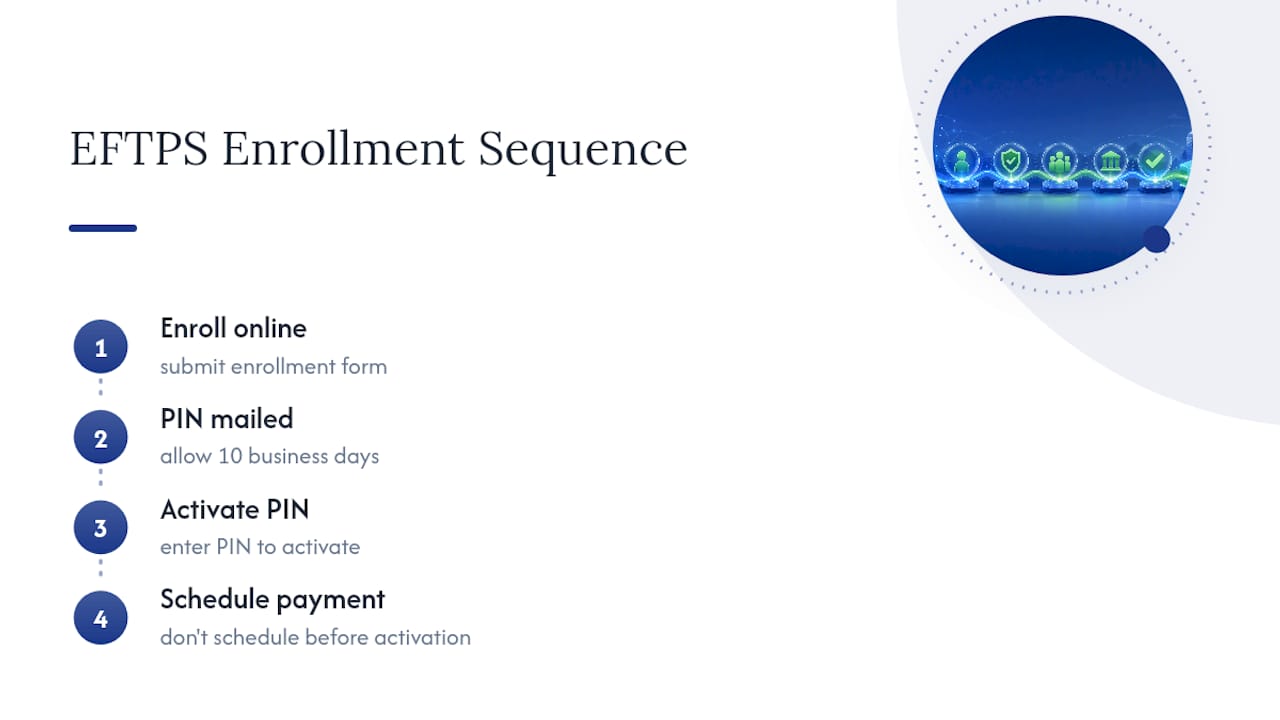
We see this pattern often: a business enrolls online, assumes it's ready to pay within a day or two, and then scrambles when the PIN hasn't arrived a week later. A 10-business-day buffer isn't a conservative suggestion. It's the realistic minimum given mail timelines. The same discipline applies to payroll providers managing Form 8655 authorizations. Without a single, clearly assigned scheduler, duplicate payments and missed deposits both become far more likely.
A complimentary payroll audit can flag enrollment gaps and timing risks before they become IRS penalties. If EFTPS setup feels like one more compliance task competing for your attention, that's exactly the kind of risk a payroll audit is designed to catch early.
— Glendale Payroll Staff
Let Glendale Payroll Handle Your EFTPS Setup
Managing EFTPS enrollment alone can be complex. Dedicated payroll professionals can handle activation, authorization, and payment scheduling as part of ongoing payroll services.

Bank information should be confirmed before the first deposit, proper third-party authorization filed for scheduling payments on your behalf, and timing coordinated to avoid duplicates or misses. Some payroll services include free payroll audits to identify enrollment gaps, timing risks, and other compliance issues before they turn into IRS penalties.
If you're a small business owner in Glendale, Burbank, Pasadena, or the Greater Los Angeles area and you'd rather hand off EFTPS enrollment entirely, visit our payroll tips page to request your free audit and see exactly what onboarding includes.
Sources
- EFTPS: The Electronic Federal Tax Payment System | U.S. Department of the Treasury
- EFTPS - The Electronic Federal Tax Payment System | IRS
- Form 9779 (Rev. 12-2011) — EFTPS Business Enrollment form | IRS
- Questions and answers about Executive Order 14247: Modernizing Payments To and From America’s Bank Account | IRS