
A paperless payroll system is a fully digital process that eliminates physical paychecks and printed payroll documents by automating all payroll functions online. The industry standard term for this is an electronic payroll system, and it covers everything from direct deposit and digital pay stubs to automated tax filing and IRS reporting. For small business owners in California and across the U.S., a well-executed paperless payroll system setup reduces compliance risk, cuts administrative time, and gives employees direct access to their own payroll records. Glendale Payroll works with businesses across Glendale, Burbank, Pasadena, and Greater Los Angeles to make this transition structured and penalty-free.
What do you need before setting up a paperless payroll system?
Preparation determines whether your digital payroll solution launches cleanly or stalls in its first week. Skipping this stage is the most common reason small businesses face data errors and compliance gaps after going live.
Legal documents and registrations
Your first task is gathering the required legal paperwork. Every employer needs an Employer Identification Number (EIN) from the IRS before processing a single paycheck. You also need completed W-4 forms from each employee for federal withholding and I-9 forms to verify work eligibility. Initial payroll setup also requires a dedicated payroll bank account, kept separate from your operating account for clean reconciliation and audit readiness.
Technical requirements and employee consent
Beyond documents, you need a payroll software platform that meets four core criteria: automation capability, built-in compliance updates, employee self-service access, and data security. The table below shows the feature categories to evaluate when selecting your platform.

| Feature category | What to look for |
|---|---|
| Automation | Automatic tax calculations, direct deposit, scheduled pay runs |
| Compliance | IRS and state tax table updates, W-2 and 1099 generation |
| Employee self-service | Digital pay stub access, W-4 updates, benefits enrollment |
| Security | Encrypted data storage, role-based access controls, audit logs |
| Integration | Connections to HR, accounting, and time tracking software |
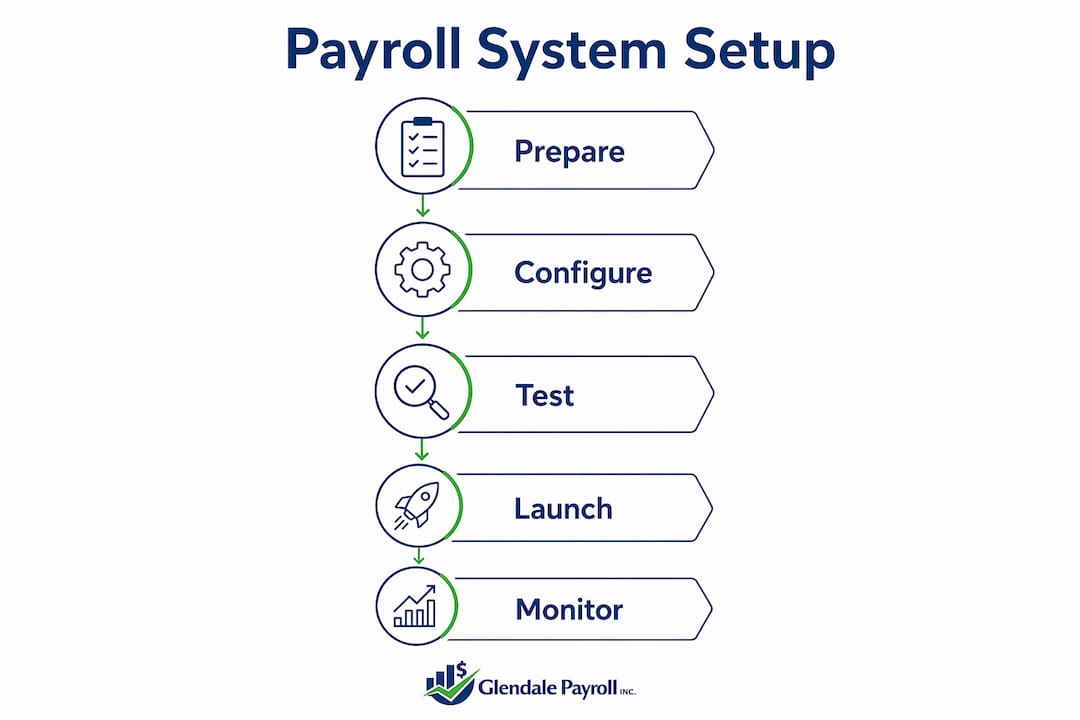
One requirement many business owners overlook: employee consent for electronic pay stubs is legally required before you stop issuing paper versions. State laws vary on the exact consent format, and non-compliance leads to penalties. Collect written or verified digital consent from every employee before your go-live date.
Pro Tip: Assign a cross-functional setup team early. A dedicated implementation team with representatives from payroll, HR, IT, and finance produces clearer requirements and a smoother rollout than a single person managing the transition alone.
How do you execute the paperless payroll system setup step by step?
A structured implementation process is the difference between a clean launch and weeks of corrections. The phases below follow the standard approach used in professional payroll implementations.
-
Define your payroll requirements. Document your pay schedules (weekly, biweekly, or semimonthly), employee classifications (W-2 employees vs. 1099 contractors), overtime rules under the Fair Labor Standards Act (FLSA), and any California-specific requirements such as SDI withholding and the UI Tax Rate Schedule.
-
Select your payroll software. Choose a platform that handles your jurisdiction's tax rules automatically. For California businesses, confirm the system supports state disability insurance (SDI), paid family leave (PFL), and local tax requirements.
-
Migrate your existing payroll data. Transfer employee records, historical pay data, tax withholding elections, and benefit deductions into the new system. Verify every record against your source documents before proceeding. Data migration errors are the leading cause of first-run payroll failures.
-
Configure the system. Set up pay schedules, tax filing frequencies, deduction codes, and direct deposit banking details. Connect the platform to your accounting software and HR tools. Cloud payroll systems integrate with HR, accounting, and time tracking software to reduce manual data entry errors and support accuracy.
-
Run a parallel payroll test. Process payroll using both your old method and the new system for one to two pay cycles. Parallel payroll testing validates accuracy before you fully cut over. Compare every line item: gross pay, deductions, net pay, and tax withholdings.
-
Train your team and employees. Walk your HR and finance staff through the administrative side of the platform. Show employees how to access their digital pay stubs, update their W-4 elections, and download tax forms. Adoption drops sharply when employees do not know how to use the self-service portal.
-
Go live and monitor closely. Run your first live payroll cycle with your setup team available to catch issues in real time. Review payroll reports immediately after each run for the first 90 days.
Pro Tip: Do not skip the parallel test phase even if your timeline is tight. One undetected configuration error in tax withholding can trigger IRS penalties and require amended filings across multiple quarters.
What challenges should you expect during and after setup?
Even well-prepared implementations hit obstacles. Knowing where problems typically appear lets you resolve them before they become compliance issues.
Common challenges include:
- Consent gaps. Some employees may not respond to consent requests promptly. Track consent status in a spreadsheet and follow up before your go-live date. You cannot legally stop issuing paper pay stubs to employees who have not consented.
- Data migration mismatches. Year-to-date payroll totals, benefit deductions, and tax withholding balances often contain small discrepancies when moved between systems. Reconcile every employee's record against your previous payroll register before the first live run.
- Parallel test discrepancies. When your new system produces different numbers than your old process, investigate the cause before assuming the new system is correct. Common culprits are misconfigured deduction codes and incorrect pay period start dates.
- IRS and state tax table updates. Payroll software must stay current with IRS and state tax reporting thresholds to avoid non-compliance penalties. Confirm your platform applies updates automatically and verify each update when it is released.
Payroll software is not a "set and forget" tool. Continuous updates aligned with tax law changes are vital for compliance. A system that was accurate in january may produce errors by october if tax tables are not refreshed. Build a quarterly review into your payroll calendar to verify that your software reflects current federal and California state requirements.
Post-launch, monitor these items on a monthly basis: payroll register accuracy, tax deposit confirmations, employee portal access rates, and any IRS or EDD notices. Catching a problem in month one costs far less than correcting six months of errors.
What are the long-term benefits of a paperless payroll system?
The efficiency gains from a fully digital payroll solution compound over time. Cloud-based payroll software automates over 90% of manual payroll tasks, saving up to 80% of monthly administrative time for small businesses. That is not a marginal improvement. It means a process that once took a full day each pay period now takes minutes.
Beyond time savings, the compliance benefits are significant. Automated payroll workflows reduce errors, speed up processing, and maintain consistent compliance with multi-jurisdiction tax laws. For businesses operating across California counties or with remote employees in other states, this matters immediately.
Employees benefit directly through self-service portals. Automated systems provide secure employee portals for pay stubs, tax forms, and benefits management, reducing HR workload and giving employees direct control over their own records. Fewer employee questions to HR means fewer interruptions to your team's day.
The table below contrasts the two approaches across key operational dimensions.
| Dimension | Paper payroll | Electronic payroll system |
|---|---|---|
| Processing time | Hours to days per cycle | Minutes with automation |
| Error rate | High due to manual entry | Low with automated calculations |
| Compliance updates | Manual, easy to miss | Automatic with quality platforms |
| Employee access | Requires HR contact | Self-service portal, 24/7 |
| Data security | Physical storage risk | Encrypted digital storage |
| Integration | None | HR, accounting, time tracking |
The payroll software integration with your accounting platform alone eliminates a significant category of manual reconciliation work each month.
Key Takeaways
A successful paperless payroll system setup requires legal preparation, structured implementation, parallel testing, and ongoing compliance monitoring to deliver lasting efficiency gains.
| Point | Details |
|---|---|
| Legal prep comes first | Collect EIN, W-4s, I-9s, and written employee consent before any software configuration begins. |
| Parallel testing is non-negotiable | Run new and old payroll side by side for 1–2 cycles to catch configuration errors before going live. |
| Automation cuts admin time sharply | Cloud payroll software automates over 90% of manual tasks, freeing up to 80% of monthly admin time. |
| Compliance requires active management | Tax tables and IRS thresholds change; review your system quarterly to stay current. |
| Integration multiplies the benefit | Connecting payroll to HR and accounting software removes manual data entry and reduces errors. |
What I have learned from watching small businesses go paperless
After working with businesses across Glendale, Burbank, and Pasadena through payroll transitions, the pattern I see most often is this: owners invest in good software and then treat it as finished work. They configure the system, run a few successful payroll cycles, and stop paying attention. Six months later, a tax table update was missed, or an employee's W-4 change was not applied, and the IRS notice arrives.
The uncomfortable truth about electronic payroll systems is that the technology does not remove your compliance responsibility. It shifts the work from manual calculation to active oversight. You still need someone who understands payroll tax rules, reviews system outputs, and catches the edge cases that automation does not handle. A new employee with a mid-year benefit change, a contractor reclassified under California's ABC test, a garnishment order that arrives after payroll is already processed. These situations require human judgment.
The businesses that get the most from their digital payroll solution are the ones that treat setup as the beginning of a process, not the end of one. They assign a point person for payroll compliance, schedule quarterly reviews, and stay current on California EDD and IRS updates. They also know when to bring in outside expertise rather than guessing. That discipline is what separates a payroll system that protects your business from one that creates a false sense of security.
— Glendale Payroll Staff
How Glendale Payroll supports your transition to digital payroll
Small businesses in California face a more complex payroll compliance environment than most. State-specific requirements like SDI, PFL, and California's wage and hour rules add layers that generic payroll software does not always handle correctly.
Glendale Payroll works directly with business owners in Glendale, Burbank, Pasadena, and Greater Los Angeles to set up and maintain compliant payroll systems. Every client starts with a free payroll audit to identify existing risks before any transition begins. The team includes dedicated payroll professionals, not call center staff, so you get expert guidance at every stage. For practical guidance specific to your situation, the California payroll tips resource covers compliance requirements, tax updates, and setup best practices for small business owners across the state. You can also review Glendale Payroll's full payroll service offerings to find the right level of support for your business.
FAQ
What is paperless payroll?
Paperless payroll is an electronic payroll system that processes employee pay, tax withholdings, and pay stub delivery entirely online, eliminating physical checks and printed documents.
Is employee consent required to go paperless?
Yes. Written employee consent is legally required before you stop issuing paper pay stubs, and the specific requirements vary by state.
How long does a paperless payroll system setup take?
A structured implementation covering requirements definition, data migration, configuration, and parallel testing typically spans several weeks before a business goes fully live.
What documents do I need to set up payroll?
You need an EIN from the IRS, completed W-4 and I-9 forms from each employee, and a dedicated payroll bank account before your first pay run.
Can payroll software handle California-specific tax requirements?
Quality cloud-based payroll platforms include California SDI, PFL, and UI Tax Rate Schedule calculations, but you should verify these features are active and updated before relying on them for compliance.
Recommended
- Employee Self-Service Payroll Setup: A 2026 Guide | Glendale Payroll Inc.
- Payroll Process Documentation: A Guide for Small Business | Glendale Payroll Inc.
- How Payroll Automation Saves Small Businesses Time and Money | Glendale Payroll Inc.
- Benefits of Integrated Payroll Solutions for Small Businesses | Glendale Payroll Inc.