
Payroll software integration is defined as the automated connection between your payroll system and other business platforms, including HR, time tracking, accounting, and tax filing tools, that eliminates manual data entry and reduces compliance risk. For small business owners, this connection is not a luxury. It is the difference between a payroll process that runs accurately every cycle and one that generates costly errors. Systems like ADP, QuickBooks, and Oracle each offer integration interfaces that sync employee records, wage data, and tax filings across platforms. Understanding the role of payroll software integration helps you protect your business from IRS penalties, audit exposure, and the administrative burden that slows growth.
What are the main types of payroll software integration and how do they work?
Payroll integration connects four core systems, and each type handles a distinct slice of your payroll workflow.
- HR integration syncs employee records automatically. When you hire a new employee, update a salary, or process a termination, those changes flow directly into payroll without manual re-entry. W-4 withholding details and direct deposit information update in real time.
- Time tracking integration pulls clock-in and clock-out data, overtime calculations, and paid time off balances directly into the payroll engine. This removes the most common source of paycheck errors: manually keying in hours.
- Accounting integration posts wage expenses, tax liabilities, and net pay disbursements to your general ledger automatically. QuickBooks, for example, receives these journal entries without any manual input from your bookkeeper.
- Third-party tax filing integration extracts payroll data into filing-ready output files for quarterly and year-end returns. Oracle's tax filing interface generates these outputs with year-to-date balances included, reducing the manual steps required for tax submissions.
| Integration Type | Data Exchanged | Primary Benefit |
|---|---|---|
| HR integration | Hire dates, salary changes, W-4 details | Eliminates duplicate employee record entry |
| Time tracking | Hours, overtime, PTO balances | Removes manual timesheet keying |
| Accounting | Wages, taxes, deductions, net pay | Automates general ledger posting |
| Tax filing | Year-to-date payroll extracts | Speeds up quarterly and annual filings |
Pro Tip: Set your HR integration to sync at least 24 hours before your payroll processing deadline. This gives the system time to capture any last-minute employee changes before the pay run locks.
What are the primary benefits of payroll software integration for small businesses?
The efficiency gains from integrating payroll systems are measurable and significant. Companies with integrated HR and payroll report up to a 70% reduction in payroll processing time. That time savings translates directly into hours your team can redirect toward revenue-generating work.

Error reduction is equally compelling. Approximately 20% of manual payrolls contain errors, and each error costs an average of $291 to correct. For a small business running payroll twice a month, even a handful of errors per year adds up to thousands of dollars in correction costs, not counting the employee relations damage from a wrong paycheck.
Beyond speed and accuracy, payroll integration supports compliance in ways that manual processes simply cannot match. Modern payroll software that integrates with accounting, time tracking, and HR platforms automates tax calculations and filing deadlines, reducing the chance of a missed deposit or an incorrect withholding. For California employers, where SDI rates, UI Tax Rate Schedules, and local wage rules shift regularly, that automated compliance layer is especially valuable.
The importance of payroll software also shows up in workforce decision-making. When payroll data flows cleanly into your accounting system, you get accurate labor cost reports without waiting for a manual reconciliation. You can see overtime trends, department-level wage costs, and benefits expenses in real time. That visibility helps you make staffing decisions based on actual numbers rather than estimates.
- Reduces payroll processing time by up to 70%
- Cuts the cost of correcting manual payroll errors
- Automates tax calculations and filing deadlines
- Improves audit readiness with consistent, reconciled records
- Delivers real-time labor cost data for better business decisions
Payroll integration also supports employee morale. Employees who receive accurate, on-time paychecks trust their employer. That trust is harder to rebuild once it is broken by repeated paycheck mistakes.
What risks should small businesses watch for when integrating payroll systems?
Integration does not eliminate risk. It shifts where the risk lives. The most common failure point is timing.
-
Late HR data updates. If a salary change or a termination is entered into your HR system after the payroll run has already processed, the paycheck will be calculated on outdated information. The calculation may be technically correct based on what the system knew, but it will be wrong in practice. Delayed updates of hires, terminations, or tax withholding changes are a leading cause of payroll miscalculations in integrated environments.
-
Tax filing extract discrepancies. The payroll data extract sent to your third-party tax filing provider is the official record. Oracle explicitly recommends treating tax filing outputs as the record of truth when investigating discrepancies. If your internal payroll report and the filing extract do not match, you need to resolve that before the return is submitted.
-
Schema mismatches between systems. Integrating payroll data from multiple vendors requires consistent data schemas. A field labeled "employee ID" in your HR system may map differently in your accounting platform, causing records to sync incorrectly.
-
Manual overrides that break the data chain. When someone manually edits a payroll figure after the integration has already run, the change may not flow back to the connected systems. Your accounting records and your payroll records then tell different stories.
Pro Tip: Build a reconciliation step into every payroll cycle. Compare your payroll register to your accounting entries and your tax filing extract before you approve the run. Catching a mismatch before submission is far less costly than correcting it after.
How can small business owners implement payroll software integration effectively?
Effective implementation starts with an honest assessment of your current tech stack. Before you connect anything, identify which systems you already use and which integration points will deliver the most immediate value.
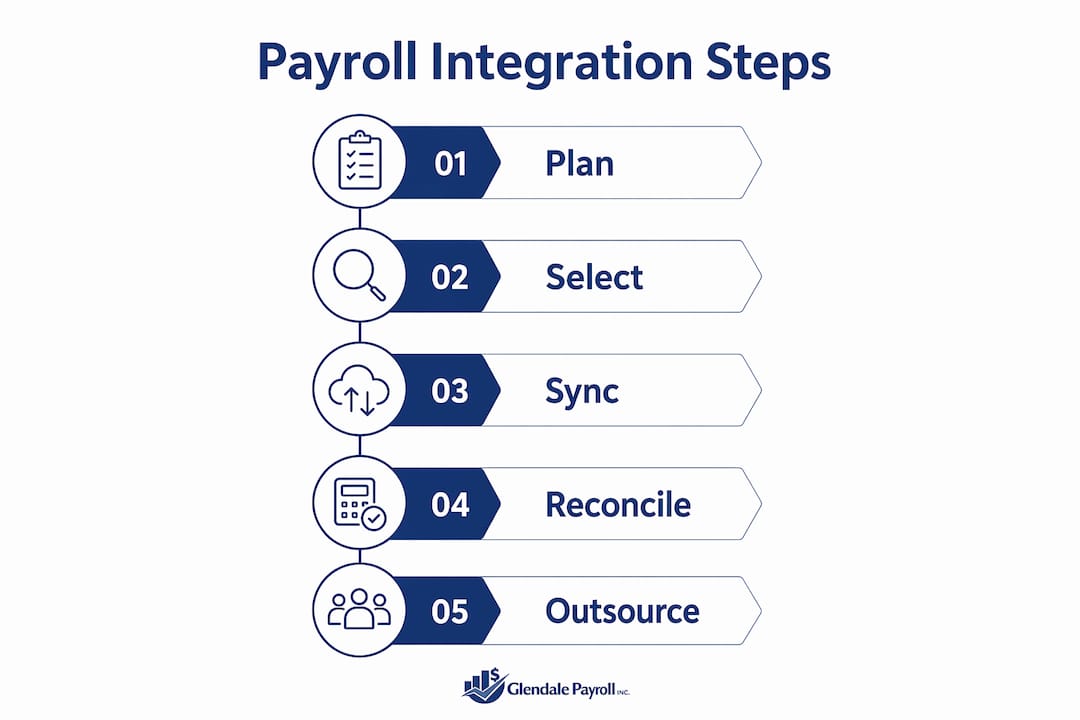
- Map your existing tools. List your HRIS, time tracking software, accounting platform, and any benefits administration tools. Identify where data currently moves manually between them.
- Prioritize high-impact integrations first. The payroll-to-accounting connection and the time tracking-to-payroll connection typically deliver the fastest return. Accounting integration reduces manual journal entries by automatically posting wage expenses, tax liabilities, and net pay, which is a high-value area for small business efficiency.
- Use vendor-native integrations before custom APIs. QuickBooks integrates natively with several payroll platforms. ADP offers direct connections to many HRIS and time tracking tools. Native integrations are more stable and require less maintenance than custom-built API connections.
- Establish update timing protocols. Set clear deadlines for when HR data must be finalized before each payroll run. Document these deadlines and communicate them to anyone who manages employee records.
- Plan for oversight, not just automation. Integration reduces manual work, but it does not replace human review. Assign someone to verify the payroll register, the accounting post, and the tax extract before each cycle closes.
| Approach | Best For | Trade-off |
|---|---|---|
| Vendor-native integration | Businesses using common platforms like QuickBooks or ADP | Limited customization |
| API-based integration | Businesses with unique or legacy systems | Requires technical setup |
| Outsourced payroll service | Businesses without internal payroll expertise | Ongoing service cost |
When your internal capacity is limited, outsourcing to a dedicated payroll management service is often the most reliable path to integration accuracy. A professional payroll provider manages the timing, reconciliation, and compliance workflows that small business owners rarely have bandwidth to monitor closely.
Key Takeaways
Payroll software integration reduces processing time, cuts error costs, and supports compliance by automating data exchange across HR, accounting, time tracking, and tax filing systems.
| Point | Details |
|---|---|
| Integration types matter | HR, time tracking, accounting, and tax filing integrations each solve a distinct payroll problem. |
| Error costs are real | Manual payrolls contain errors in roughly 20% of cases, costing an average of $291 each to fix. |
| Timing is the top risk | HR data must be finalized before payroll runs to avoid calculations based on incomplete records. |
| Tax extracts are official records | Reconcile your internal payroll report against the tax filing extract before every submission. |
| Outsourcing fills the gap | When internal expertise is limited, a professional payroll service manages integration accuracy and compliance. |
What I have learned from watching small businesses get integration wrong
Working with employers across Glendale, Burbank, Pasadena, and Greater Los Angeles, I have seen a consistent pattern. Business owners invest in good payroll software, connect it to QuickBooks or their HRIS, and then assume the work is done. It is not.
The integrations that fail are almost never the result of bad software. They fail because of process gaps around timing and reconciliation. A manager updates a salary in the HR system the same afternoon payroll runs. The change does not make it into the current cycle. The employee gets the wrong check. The employer scrambles to issue a correction. That sequence is avoidable, but only if you treat integration as an ongoing workflow, not a one-time setup.
The other mistake I see regularly is treating the payroll register as the authoritative document for tax purposes. The tax filing extract is the official record. If those two documents do not match, you have a problem that will surface in an audit, not in your internal reports. Building a reconciliation habit into every payroll cycle is the single most underrated practice in small business payroll management.
Integration is not optional for businesses that want to grow. As you add employees, the manual processes that worked at five people break down at fifteen. The payroll automation benefits compound over time, but only if the foundation is set up correctly and reviewed regularly. Treat your integrations as living systems, not set-and-forget configurations.
— Glendale Payroll Staff
How Glendale Payroll supports integrated payroll for California businesses
Small business owners in California face some of the most complex payroll requirements in the country, from SDI contributions to UI Tax Rate Schedules and strict wage-and-hour rules.
Glendale Payroll works with businesses across Glendale, Burbank, Pasadena, and the Greater Los Angeles area to build payroll processes that connect accurately with accounting and tax filing systems. The team handles reconciliation, update timing, and compliance workflows so you are not left managing those details alone. Explore California payroll tips built specifically for small business owners, or review the full range of payroll services Glendale Payroll offers. Every new client starts with a free payroll audit to identify integration gaps and compliance risks before they become penalties.
FAQ
What is payroll software integration?
Payroll software integration is the automated connection between your payroll system and other business platforms, such as HR, time tracking, and accounting tools, that syncs data without manual entry.
How does payroll integration reduce errors?
Integration removes manual data re-entry between systems. Since approximately 20% of manual payrolls contain errors, automating data transfer directly cuts the frequency and cost of paycheck mistakes.
What is the biggest risk when integrating payroll systems?
Timing is the primary risk. If HR data such as salary changes or terminations is not finalized before the payroll run, the system calculates pay on incomplete information, producing inaccurate paychecks.
Why should I reconcile my tax filing extract with my payroll register?
The tax filing extract is the official record submitted to tax authorities. Oracle recommends treating this extract as the record of truth, so any discrepancy with your internal register must be resolved before filing.
When should a small business outsource payroll instead of managing integration internally?
Outsourcing makes sense when your team lacks the bandwidth to manage update timing, reconciliation, and compliance workflows consistently. A dedicated payroll provider handles these steps as part of their standard process.