
The most effective ways to reduce payroll processing time combine automation, centralized data, and disciplined workflows. For many small businesses, payroll automation compresses a process that once consumed several hours into under 20 minutes per pay run. 75% of automated payroll users spend 15 minutes or less on each pay run. The core methods are straightforward to implement and deliver measurable results quickly.
The six methods that cut payroll cycle time most reliably:
- Automate payroll calculations. Software handles overtime, tax withholding, garnishments, and deductions without manual input, eliminating the most error-prone step in the cycle.
- Centralize payroll records. A single system of record for employee data, pay rates, and tax information prevents the version-control problems that slow down every pay period.
- Integrate time tracking with payroll. When approved timesheets flow directly into your payroll platform, you eliminate manual data re-entry entirely.
- Use digital approval workflows. Automated routing with deadline-aware escalation means a missing manager never stalls your payroll run.
- Train payroll staff on current tools. Even well-configured software underperforms when the people running it rely on workarounds from older processes.
- Handle payroll data securely and compliantly. Clean, audit-ready records speed up both internal reviews and any IRS employment tax examinations.
What are the best practices to speed up payroll processing?
The practices that consistently cut payroll cycle time share a common thread: they remove human touchpoints from steps that software handles better.
Adopt app-based time and attendance tracking. Physical timesheets are the single biggest bottleneck in most payroll cycles. Digital time tracking significantly reduces processing time by eliminating the scramble to collect, read, and manually enter paper records. Employees clock in and out via a mobile app; timesheets generate automatically and route to managers for review.
Integrate payroll with HR and accounting systems. Data silos between your HRIS, payroll platform, and accounting software force manual exports and reconciliations that add hours to every pay period. When these systems share data in real time, a new hire entered in HR appears in payroll automatically, and journal entries post to your general ledger without a separate upload.
- Automate complex pay rules. Overtime thresholds, shift differentials, bonuses, and California-specific requirements like split-shift premiums should be configured once in your payroll software and applied automatically each cycle.
- Build deadline-aware approval routing. If a primary approver misses a deadline, the system should escalate to a backup automatically. This single configuration change prevents most late payroll submissions.
- Create a separate exception lane. Off-cycle checks, reversals, and wage garnishments need their own documented workflow. Mixing them into the main payroll run is a reliable way to introduce errors and delay the entire cycle.
- Validate data before you run payroll. A pre-processing audit that flags missing hours, duplicate entries, or rate mismatches takes minutes and prevents the correction cycles that take days.
- Schedule regular staff training. Payroll software updates frequently. A quarterly review of new features and workflow changes keeps your team using the tools at full capacity rather than defaulting to manual steps.
Pro Tip: Set a hard cutoff for timesheet submission two business days before your payroll processing date. Pair it with an automated reminder that goes out 24 hours before the deadline. Late submissions drop sharply when employees know the deadline is enforced by the system, not just by a follow-up email.
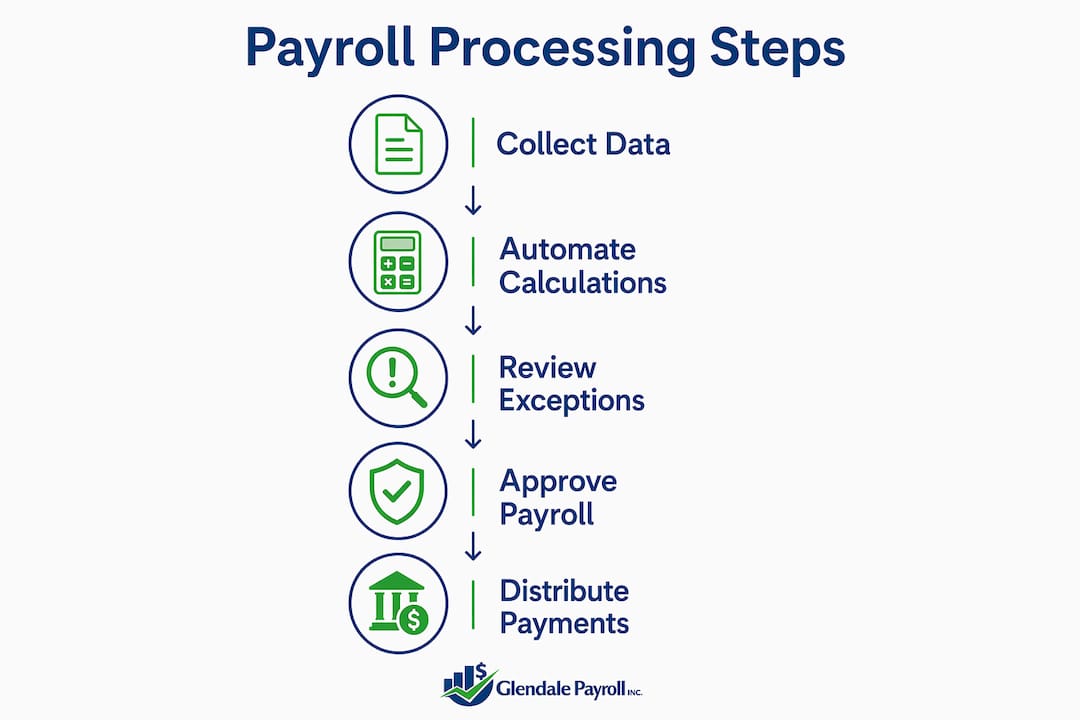
How to run efficient payroll processing step by step
A structured sequence eliminates the ad hoc decisions that slow most payroll cycles. Follow these steps in order, and you will find that most of the work happens before you ever open your payroll platform.
-
Collect and approve time data digitally before the pay period closes. Employees submit hours through a time-tracking app; managers review and approve from their phones. Automated reminders handle follow-up so you do not have to.
-
Import approved timesheets automatically into your payroll software. No CSV files, no copy-and-paste. The integration pulls approved data directly, preserving all rate and classification information.
-
Let the software apply pay rules, tax calculations, and deductions. Overtime, federal and state withholding, Social Security, Medicare, and any voluntary deductions should calculate without manual input. Review the output, not the math.
-
Route the payroll preview to designated approvers with automated notifications. Set escalation rules so that if an approver does not act within a defined window, the next person in line receives an alert automatically.
-
Submit approved payroll to your provider or bank via API. Direct API connections to platforms like QuickBooks, ADP, or Paychex eliminate the manual file uploads that introduce transmission errors and add processing time.
-
Distribute pay stubs electronically and post journal entries automatically. Employee self-service portals handle pay stub delivery. Accounting integrations post the corresponding entries to your general ledger in the same step.
-
Run parallel cycles for 1–2 pay periods during any system transition. Parallel processing lets you compare automated results against your previous method before you commit fully. Discrepancies surface early, when they are easy to resolve.
-
Monitor exceptions and refine your workflow continuously. After each cycle, review flagged items: overtime anomalies, missed punches, rate changes. Address them before the next run, and update your configuration to prevent recurrence.
Why does payroll automation reduce processing time so dramatically?
The evidence on automation's impact is consistent across business sizes and industries. Payroll automation reduces processing time substantially and cuts manual interventions greatly, compressing cycles that once took multiple days into a single day or less. For small businesses specifically, many automated payroll users spend minimal time on a pay run, with automation saving significant hours per year.

The approval bottleneck is often underestimated. When a primary approver is unavailable, a manual process simply waits. An automated routing system with escalation rules and backup approvers prevents missed deadlines without requiring anyone to chase down a manager.
By the numbers: Payroll automation reduces errors and decreases HR inquiries substantially. Manual processing for small businesses typically takes about a week per cycle; automated runs shorten this time considerably, with the majority of automated payroll users completing pay cycles in 15 minutes or less, and more advanced platforms finishing cycles in under a day.
Integration between payroll, HR, and accounting systems is where the compounding gains appear. Data silos between these platforms force manual exports and reconciliations that add hours to every pay period. When the systems share data in real time, the reconciliation step disappears entirely.
Exceptions require a different approach. Off-cycle checks, reversals, and garnishments need a separate documented lane so they do not disrupt the main automated cycle. This is not a limitation of automation. It is a design choice that keeps your routine runs clean and your exception handling auditable.
Automation also does not replace payroll expertise. The balance between automation and human oversight is what keeps compliance intact. Software handles the calculations; your payroll professionals handle the judgment calls, the exceptions, and the regulatory updates that no algorithm anticipates on its own. For California businesses in particular, where FLSA recordkeeping requirements and state-specific rules add complexity, that human layer is not optional.
How do you choose payroll software that fits your business?
The right payroll platform depends on your headcount, your pay complexity, and how much of your current process you want to automate versus outsource.

For businesses with fewer than 25 employees, the priority is simplicity and direct integration with your accounting software. QuickBooks Payroll connects directly to QuickBooks Online, which means your general ledger updates automatically with each payroll run. Setup is straightforward, and the learning curve is low for teams already using QuickBooks for bookkeeping.
For businesses with 25–200 employees, pay complexity usually increases: multiple pay rates, shift differentials, benefits deductions, and state tax obligations across different jurisdictions. Platforms like Paychex Flex offer built-in compliance tools, HR modules, and dedicated support that scale with that complexity. The integration capabilities matter here. Look for platforms that connect to your HRIS and time-tracking tools via API rather than file exports.
For larger or multi-state operations, ADP Workforce Now provides enterprise-grade compliance management, including automated tax filing across all U.S. jurisdictions. The payroll software integration between ADP and major HRIS platforms eliminates the manual reconciliation that consumes hours in multi-system environments.
Regardless of business size, evaluate any platform on these criteria before committing:
- Direct integration with your existing accounting and HR systems
- Automated tax filing for federal, state, and local obligations
- Employee self-service for pay stubs, W-2s, and direct deposit updates
- Audit trail and reporting capabilities that satisfy EEOC recordkeeping requirements
- Dedicated support from payroll professionals, not a general help desk
Pro Tip: Before selecting a platform, document your current payroll workflow step by step. Identify every manual handoff. The right software should eliminate at least 80% of those handoffs. If a vendor cannot show you exactly how their platform handles your specific pay rules and compliance requirements, that is a gap worth probing before you sign a contract.
For California businesses, state-specific requirements add another layer of evaluation. SDI calculations, UI Tax Rate Schedule updates, and the ABC test for contractor classification all need to be handled correctly by your platform or your payroll provider. Glendale Payroll's California payroll tips cover the state-specific configurations that matter most for businesses in the Greater Los Angeles area.
Key Takeaways
Automating payroll and integrating your systems is the most direct path to cutting cycle time, reducing errors, and staying compliant in 2026.
| Point | Details |
|---|---|
| Automation cuts cycle time sharply | Automated payroll reduces processing from several hours to under 20 minutes for many small businesses; 75% of users complete a pay run in 15 minutes or less. |
| Manual timesheets are the top bottleneck | Digital time tracking integrated with payroll significantly reduces processing time. |
| Parallel cycles protect accuracy | Run automated and manual payroll side by side for 1–2 cycles before switching fully. |
| Exceptions need a separate lane | Off-cycle checks and garnishments require their own documented workflow to keep main runs clean. |
| Software choice depends on complexity | Match your platform to headcount, pay rules, and integration needs, not just price. |
Ready to cut your payroll cycle time and stay compliant with California's requirements? Glendale Payroll's dedicated payroll professionals offer a free comprehensive payroll audit to identify where your process is losing time and where compliance risks are hiding. Whether you're in Glendale, Burbank, Pasadena, or anywhere in Greater Los Angeles, you get expert guidance, not a call center.

Schedule your free payroll audit today and see exactly what a faster, more accurate payroll process looks like for your business. Visit Glendale Payroll services to get started.
Recommended
- Payroll Date Management: A 2026 Guide for Small Businesses | Glendale Payroll Inc.
- 5 Signs It's Time to Outsource Your Payroll | Glendale Payroll Inc.
- Benefits of Integrated Payroll Solutions for Small Businesses | Glendale Payroll Inc.
- How Payroll Automation Saves Small Businesses Time and Money | Glendale Payroll Inc.