
For tax year 2026, you must furnish employee copies of Form W-2 by February 1, 2027 (the January 31 deadline shifts because it falls on a Sunday), and you must file Copy A with the Social Security Administration by that same February 1, 2027 date. Both paper and electronic submissions share this deadline. Miss it, and per-form penalties apply on a sliding scale, with e-filing mandatory for most employers.
TL;DR:
- Employers must send employee copies of W-2 by February 1, 2027, and file with the SSA by the same date, which shifts from January 31 due to weekend timing.
- E-filing is mandatory for employers submitting 10 or more information returns, while paper filings are timely if postmarked by February 1, 2027.
- Rejection causes include mismatched employer identification numbers, incorrect form totals, and delays in corrected filings, so early testing and verification are essential.
- Employee W-2s must be delivered via mail, hand delivery, or electronic consent, with a February 1, 2027, deadline, including special rules for employee requests or departures.
- Penalty fines escalate from $60 to $340 per form based on correction timing, and penalties for late filing and furnishing are separate and can accumulate significantly.
Table of Contents
- What Are the 2026 W-2 Filing Deadlines?
- Filing W-2s With the SSA: Exact Rules and What "Filed" Means
- Furnishing W-2s to Employees: Delivery Methods, Timing, and Special Cases
- Electronic Filing Requirements and Key Systems
- Penalties for Late or Incorrect W-2 Filings
- Extensions and Corrections: Form 8809, Form 15397, and W-2c
- Practical Checklist and Timeline for Payroll Teams
- How a Managed Payroll Provider Reduces W-2 Risk
- Get Your W-2 Filing Handled Before the Deadline
- Sources
- FAQ
What Are the 2026 W-2 Filing Deadlines?
Every employer needs the same two dates locked into the payroll calendar. Here's the compact version you can save or print.
| Requirement | Deadline | Applies to |
|---|---|---|
| Furnish W-2 to employees | February 1, 2027 | Copies B, C, and 2 |
| File Copy A with SSA | February 1, 2027 | Paper and electronic |
| Threshold for mandatory e-filing | 10+ information returns | All employers meeting the count |
Both deadlines normally land on January 31. For 2026 forms, that date falls on a Sunday, so the deadline moves to the next business day, Monday, February 1, 2027. This shift happens automatically whenever January 31 lands on a weekend or federal holiday. You don't need to file for an extension to get the extra day.
A few things to keep straight as you plan:
- Paper filings are considered timely if postmarked by the deadline, not received by it.
- Electronic transmissions must be successfully submitted and accepted by the deadline, not merely started.
- The furnishing deadline and the SSA filing deadline are separate obligations. Meeting one doesn't satisfy the other.
- Both fall on the same calendar date for 2026, which makes planning simpler but leaves zero cushion if either process stalls.
Filing W-2s With the SSA: Exact Rules and What "Filed" Means
The due date for filing 2026 Forms W-2 and W-3 with the SSA is February 1, 2027, and that date applies whether you're mailing paper forms or transmitting electronically. The shift from January 31 happens because the SSA and IRS both treat federal filing deadlines as moving to the next business day when the standard date lands on a weekend or holiday. For 2026, that's a two-day slide from Saturday, January 31, to Sunday, and finally to Monday, February 1.
Copy A of Form W-2 goes to the SSA, accompanied by Form W-3 (the transmittal summary) when you file on paper. Form W-3 essentially reconciles your individual W-2 totals against what you report elsewhere, so accuracy here matters as much as timeliness. Paper submission is still technically acceptable, but only for employers filing fewer than 10 information returns. Anyone over that threshold must file electronically, which effectively eliminates paper filing for most small and mid-sized businesses.
"Filed" has a specific meaning depending on your method:
- Paper filing counts as filed when the envelope is postmarked by the USPS on or before the deadline.
- Electronic filing counts as filed when the SSA's system accepts the transmission, not when you hit submit.
- A rejected electronic file that you don't resubmit before the deadline is treated as not filed at all.
Common rejection triggers include mismatched employer identification numbers, missing or malformed RE (employer) records, and totals on Form W-3 that don't reconcile with the sum of your W-2s. Building in a few days of buffer before the deadline gives you room to fix a rejection without becoming late.
Furnishing W-2s to Employees: Delivery Methods, Timing, and Special Cases
Employees must receive Copies B, C, and 2 of their W-2 by January 31 following the tax year, which for 2026 forms becomes February 1, 2027, under the same weekend shift rule that applies to SSA filing. This is a distribution deadline, not a filing deadline. It governs when the employee has the form in hand, not when you submit anything to a government agency.
You have three acceptable delivery methods:
- Mail the form to the employee's last known address, postmarked by the deadline.
- Hand-deliver at the worksite, which satisfies the requirement immediately.
- Deliver electronically, but only if the employee has given affirmative consent to electronic delivery in advance. Default electronic access without consent doesn't count.
Keep records of delivery method and date for every employee. If the IRS ever questions your furnishing timeline, that documentation is your defense.
Two special cases trip up payroll teams every year. First, if an employee formally requests their W-2 in writing, you have 30 days to respond, even outside the normal furnishing window. Second, an employee who leaves before year-end is still owed a W-2 by the standard February 1, 2027, deadline. You're not required to issue it early just because employment ended in June.
Pro Tip: Build electronic consent into your onboarding paperwork rather than chasing it down in December. Retroactive consent requests during year-end crunch are a common source of missed furnishing deadlines.
Electronic Filing Requirements and Key Systems
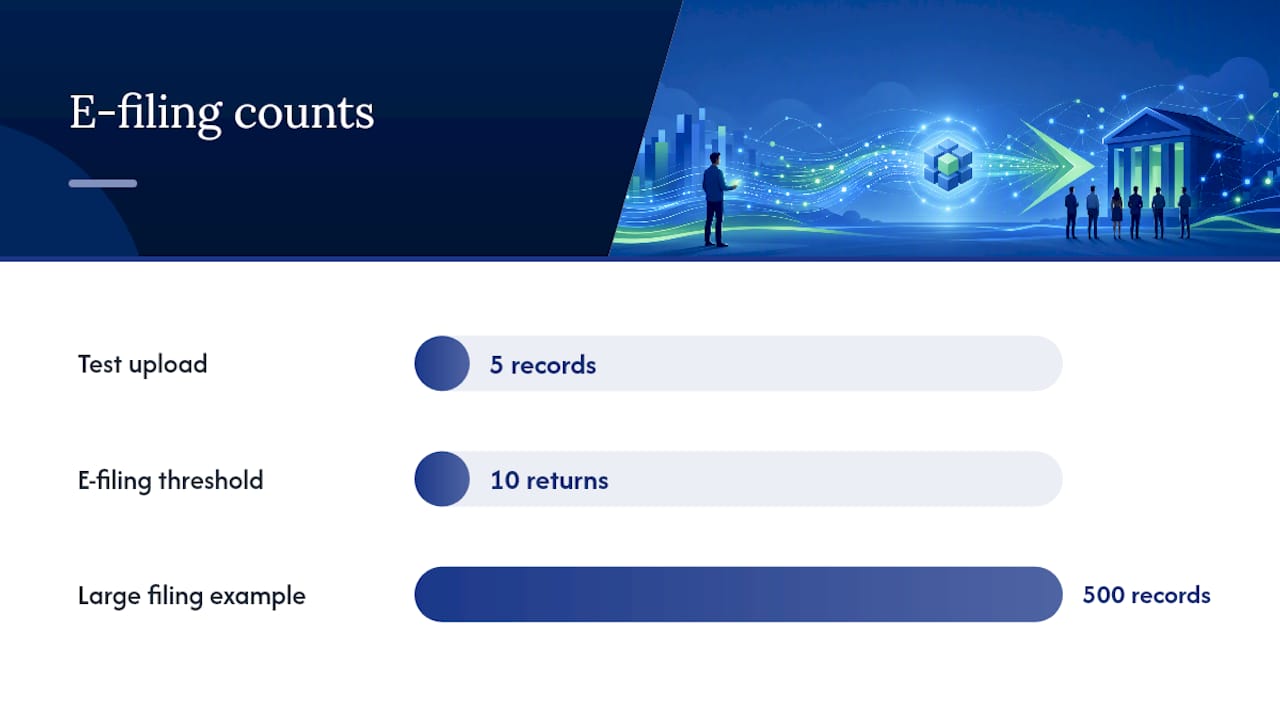
The e-filing threshold matters more than most employers realize. Since 2024, any employer filing 10 or more information returns total across all form types, not just W-2s, must file electronically. That count includes 1099s and other information returns your business files, so a small company that seems paper-eligible on W-2s alone may still cross the threshold once other filings are added in.
Three systems handle electronic W-2 submission:
- Business Services Online (BSO) lets you register a Social Security account and upload files or use the built-in W-2 Online tool to key in forms directly, useful for employers with a small number of employees.
- EFW2 file upload through BSO accepts bulk-formatted files, the standard route for payroll software exporting large employee counts.
- IRIS, the IRS's newer information returns platform, is expanding its role for filers who also handle other information return types, and the transition away from older legacy formats is ongoing.
Register with BSO well before the deadline. New account setup and employer authorization can take longer than expected, especially if you're filing under a new EIN for the first time.
Watch for these common rejection causes: missing or incorrectly formatted RE records, employer name or EIN mismatches with SSA records, and file totals that don't tie out to your W-3 summary.
Pro Tip: Run a test upload with a small batch of records two to three weeks before the deadline. Catching a formatting error on 5 employees is a lot less stressful than discovering it on 500.
Penalties for Late or Incorrect W-2 Filings
Penalty exposure scales with how late you are, and it applies separately to filing and furnishing. For 2026, per-form penalties are tiered: $60 if you correct within 30 days of the deadline, $130 if you correct between 31 days and August 1, and $340 if you correct after August 1. Intentional disregard carries a substantially higher penalty with no cap.
| Correction timing | Penalty per form |
|---|---|
| Within 30 days | $60 |
| 31 days to August 1 | $130 |
| After August 1 | $340 |
| Intentional disregard | Higher, uncapped |
Here's the detail that catches employers off guard: filing penalties under IRC 6721 and furnishing penalties under IRC 6722 are separate and can stack. Filing Copy A late with the SSA triggers one penalty; failing to furnish the employee copy on time triggers a second, distinct penalty, even for the exact same W-2.
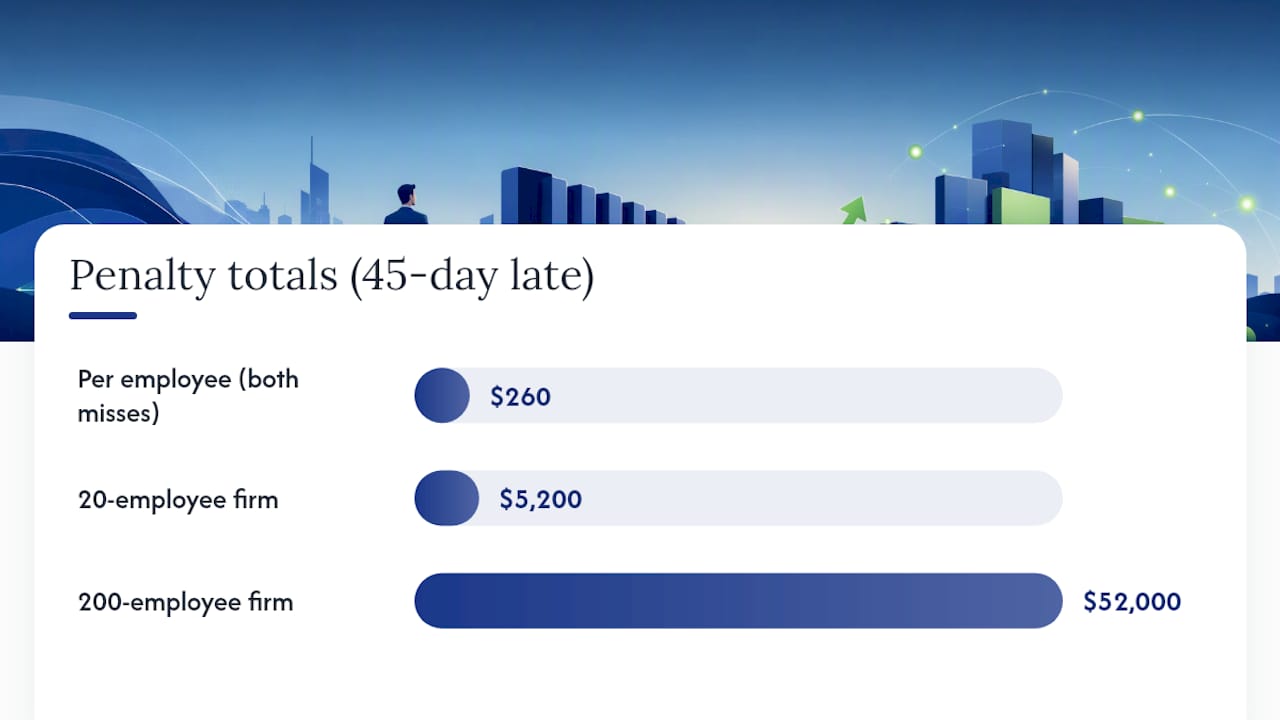
Consider a 20-employee business that files 45 days late. At the $130 tier for both the SSA filing miss and the employee furnishing miss, that's $130 x 20 x 2, or $5,200, before any consideration of intentional disregard. A 200-employee employer in the same situation faces $52,000. Correcting an error doesn't erase a penalty for the original late filing, either. Fix problems fast, but don't assume a quick correction wipes the slate clean if the initial submission missed the deadline.
Extensions and Corrections: Form 8809, Form 15397, and W-2c
Extensions for W-2 filing are narrow by design, and you shouldn't count on one as a fallback plan. Filing extensions through Form 8809 grant at most 30 days, and only in extraordinary circumstances such as a natural disaster, a fire destroying records, or the death of the person responsible for filing. Routine "we're behind" situations don't qualify.
Furnishing extensions work differently. Form 15397 requests more time to deliver copies to employees, and approvals typically run no more than 15 days beyond the original deadline unless you can document a genuinely unusual disruption.
If you discover an error after filing, whether it's a wrong Social Security number, an incorrect wage amount, or a misreported withholding figure, file Form W-2c promptly. A few practical notes on sequencing:
- Correct errors as soon as you find them. Penalty tiers are tied to how quickly you fix the mistake, not just when you originally filed.
- Batch multiple corrections into a single upload when possible, which reduces repeated validation delays on BSO.
- Keep a paper trail of when you identified the error and when you submitted the correction. That timeline matters if the IRS questions your response time.
Practical Checklist and Timeline for Payroll Teams
Working backward from February 1, 2027, gives your team enough runway to catch problems before they become penalties.
- 8 weeks out: Solicit any missing employee TINs and Social Security numbers, and verify them using SSA's verification tools rather than assuming what's on file is correct.
- 6 weeks out: Reconcile year-to-date payroll totals against your quarterly Form 941 filings to catch discrepancies early.
- 4 weeks out: Produce draft W-2s and route them for HR and finance sign-off.
- 2 weeks out: Register or confirm access to BSO or IRIS, and run a small test upload to check for formatting errors.
- 1 week out: Finalize furnishing method for each employee, confirming electronic consent records are current.
- Filing week: Submit Copy A to the SSA and furnish employee copies, keeping proof of postmark or electronic transmission confirmation.
A payroll date management plan built around this kind of timeline turns year-end from a scramble into a routine.
Pro Tip: Set a hard payroll freeze date about a week before filing, and require documented sign-off for any change after that point. Last-minute wage or withholding edits are one of the most common causes of W-2 corrections.
How a Managed Payroll Provider Reduces W-2 Risk
Most of the W-2 problems we see at Glendale Payroll trace back to the same root causes: a Social Security number that was never verified at hire, a payroll adjustment made after the freeze date, or an EIN mismatch nobody caught until the SSA rejected the file. None of these are complicated to prevent. They just require someone paying attention at the right moment, which is exactly where dedicated payroll professionals earn their value over a call-center model that processes your file without really looking at it.
A free payroll audit exists precisely to catch these gaps before they turn into February surprises. Reviewing your TIN solicitation records, your reconciliation between payroll and Form 941, and your BSO registration status a month out costs you nothing and often prevents a five-figure penalty exposure. That's the entire logic behind building compliance into a recurring service rather than a once-a-year fire drill.
— Glendale Payroll Staff
Get Your W-2 Filing Handled Before the Deadline
Chasing down missing TINs, formatting BSO uploads, and tracking furnishing deadlines is a lot to manage on top of running a business, and a single missed date can cost more than a year of payroll fees. There are payroll service providers that offer dedicated payroll professionals who review your filings, as opposed to call-center models.

Some payroll services may start new engagements with a free comprehensive payroll audit to flag SSN mismatches, reconciliation gaps, and e-filing readiness issues before they become penalty notices. From there, Glendale Payroll handles W-2 preparation, electronic filing, and year-end compliance as part of your ongoing service, alongside direct deposit and new hire reporting.
Check current pricing and plans, or explore the signs it's time to outsource your payroll if you're weighing whether this is the year to hand off year-end filing for good.
Sources
A handful of government pages cover everything in this article in more granular detail, and it's worth bookmarking them directly rather than relying on secondhand summaries.
For California-specific year-end obligations that run alongside these federal deadlines, Glendale Payroll's year-end payroll checklist covers state filing requirements many employers overlook. Employers managing hourly or shift-based staff should also review fair workweek compliance requirements, since scheduling recordkeeping often intersects with payroll documentation.
This article is general information, not a substitute for advice from a qualified financial advisor. Consult a qualified financial professional about your own circumstances before acting on anything here.
FAQ
When Is the W-2 Deadline for 2026 Tax Forms?
Both the employee furnishing deadline and the SSA filing deadline for tax year 2026 W-2 forms fall on February 1, 2027. The standard January 31 date shifted because it lands on a Sunday, pushing both obligations to the next business day.
Do Paper and Electronic W-2 Filings Have the Same Deadline?
Yes, both share the February 1, 2027 deadline for tax year 2026. Paper filers must have their envelope postmarked by that date, while electronic filers need their transmission accepted by the SSA's system.
What Happens if I File W-2s Late?
Penalties are tiered based on how late you are: $60 per form within 30 days, $130 through August 1, and $340 after that, with a higher uncapped penalty for intentional disregard. Filing and furnishing penalties are separate and can stack for the same form.
Can I Get an Extension to File W-2s?
Extensions are limited and not automatic. Form 8809 can grant up to a 30-day filing extension, but only for extraordinary circumstances like a disaster or destroyed records, and Form 15397 covers furnishing extensions of typically no more than 15 days.
How Much Does Glendale Payroll Charge for Payroll and W-2 Services?
Glendale Payroll's Monthly Service is $105 per company plus $12 per employee, with a one-time $100 setup fee for onboarding. Full pricing details are available on the pricing page.