
Automated payroll is defined as a software-driven system that calculates, manages, and distributes employee pay by applying standardized rules and integrated workflows with minimal manual input. For small business owners, this means payroll tax automation, accurate deductions, and IRS-compliant filings happen without hand-entering data every pay period. The IRS and Social Security Administration set the federal standards that automated payroll systems are built around, making compliance a built-in feature rather than an afterthought. Glendale Payroll works with small businesses across Greater Los Angeles to deliver exactly this kind of structured, compliant payroll processing.
What is automated payroll and how does it work?
Automated payroll systems bring payroll data, rules, workflows, and controls into one platform, reducing manual work and improving accuracy and compliance. The system pulls data from time tracking, HR records, and accounting tools, then applies your pay rates, tax withholding tables, and deduction rules automatically. The result is a calculated payroll run that reflects current federal and state requirements without requiring your team to look up every rate manually.
The core workflow follows a predictable sequence. Employees clock in and out using a time tracking tool. That data flows into the payroll platform. The system applies wage rates, calculates FICA withholding, state income tax, SDI contributions, and any voluntary deductions like 401(k) or health insurance premiums. It then generates pay stubs and initiates direct deposit or check printing.

Payroll software integration with your existing HR and accounting tools is what separates a functional automated system from a basic calculator. When your HR system updates an employee's pay rate or benefit election, that change should flow directly into payroll without a second manual entry. This single-source-of-truth approach eliminates the version-control errors that plague businesses still running payroll on spreadsheets.
One of the most underappreciated payroll automation features is exception management. Exception alerts flag unusual data, such as abnormal hours, a missing tax form, or a sudden change in tax status, for human review before the payroll run finalizes. This proactive alerting separates a well-built automated system from one that simply runs calculations blindly.
Pro Tip: Set your exception thresholds conservatively at first. It is better to review a few false positives than to miss a legitimate error that triggers an IRS penalty.
Approval workflows and audit trails round out the system. Every payroll run generates a record of who approved what and when, which is exactly what you need if the IRS or California EDD ever requests documentation.
What are the key benefits of automated payroll for small businesses?
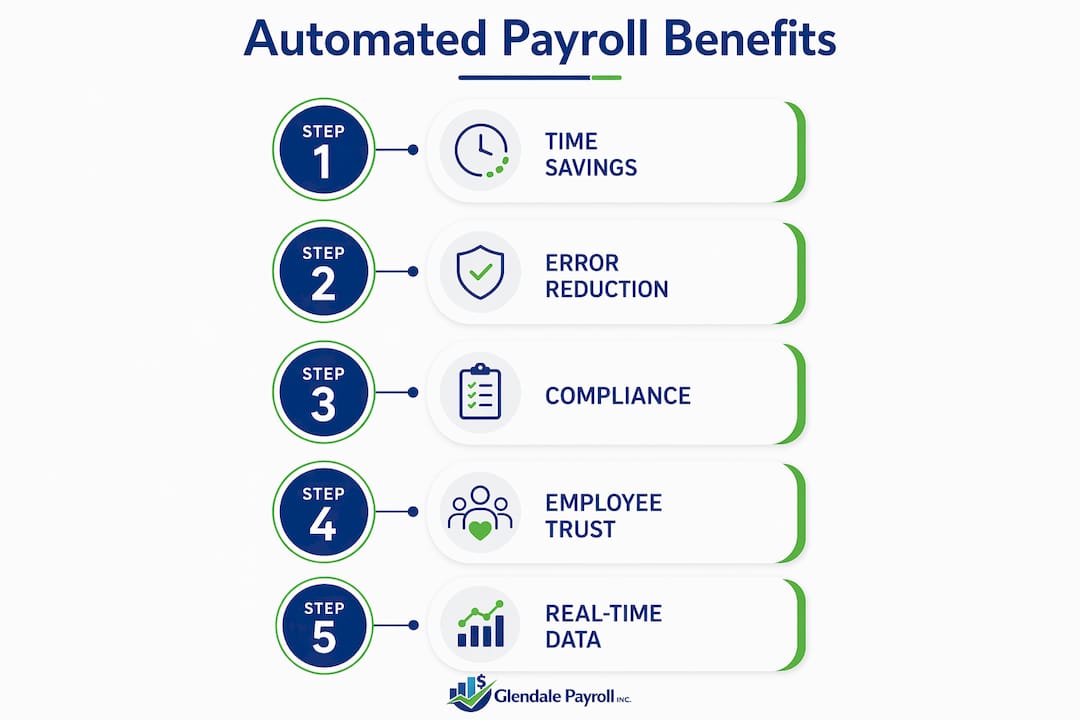
Payroll automation delivers five concrete advantages that directly affect your bottom line and your compliance standing.
-
Fewer errors. Automation reduces errors by eliminating the manual data entry that causes most payroll mistakes. A transposed digit in a Social Security number or a missed overtime calculation can trigger penalties, amended returns, and employee complaints. Automated calculations apply the same rules every time.
-
Time savings. Manual payroll can consume hours each pay period for a business with even 10 employees. Automated payroll compresses that work to reviewing an exception report and clicking approve. Your HR staff can redirect that time to hiring, training, or employee relations.
-
Compliance with tax and labor regulations. Payroll automation improves compliance by keeping tax tables current and applying them consistently. For California businesses, this matters especially because the state updates its SDI rate, UI Tax Rate Schedule, and minimum wage thresholds regularly. A system that auto-updates these rates keeps you current without requiring you to track every regulatory change.
-
Scalability as you grow. A manual process that works for five employees breaks down at 25. Automated payroll systems handle additional employees, new pay types, and multi-location payroll without proportional increases in administrative effort.
-
Employee self-service access. Self-service portals let employees view pay stubs, download W-2s, and update their direct deposit details without contacting HR. This reduces the volume of routine payroll inquiries your team handles each week.
"Automated payroll transforms a compliance liability into a managed process. When your system applies the correct withholding rates, files on time, and flags exceptions before they become penalties, payroll stops being a source of anxiety and starts functioning as a reliable operational foundation."
The automated payroll benefits extend beyond efficiency. Consistent, on-time payments build employee trust. Accurate tax filings protect you from IRS notices. And a clean audit trail gives you confidence during any state or federal review.
How does automated payroll compare with manual payroll processing?
Manual payroll requires human engagement at every step. Someone enters hours, calculates gross pay, looks up withholding tables, subtracts deductions, and records the transaction. Manual payroll demands hand entry at each stage, which multiplies the opportunities for error as your team size grows.
| Category | Manual payroll | Automated payroll |
|---|---|---|
| Data entry | Hand-keyed each pay period | Pulled from integrated systems |
| Tax table updates | Manual research required | Applied automatically |
| Error rate | Higher due to human input | Lower with rule-based calculations |
| Audit trail | Paper records or spreadsheets | Digital logs with timestamps |
| Compliance updates | Owner or accountant must track | System updates built in |
| Time per pay run | Hours for small teams | Minutes after setup |
Manual payroll is not always the wrong choice. A sole proprietor with one or two part-time employees and simple, fixed pay may find that a spreadsheet and a quarterly accountant review is sufficient. The calculation is straightforward and the compliance burden is manageable.
The calculus changes the moment you add overtime, multiple pay rates, commission structures, or California-specific requirements like mandatory sick leave accrual tracking. At that point, the error risk and time cost of manual processing outweigh any savings from not paying for software.
Automating payroll processes also gives you real-time data access. You can pull a labor cost report mid-month, see year-to-date tax liabilities, or check a specific employee's deduction history in seconds. Manual systems require digging through files or rebuilding calculations from scratch.
Pro Tip: If your payroll takes more than two hours per pay period or you have had even one tax penalty in the past year, the cost of automated payroll software pays for itself quickly.
What steps should small business owners take to implement automated payroll?
Switching to an automated system requires planning, but the process is straightforward when you follow a clear sequence.
-
Assess your payroll complexity first. Count your employees, pay types, and states where you have workers. Identify whether you pay hourly, salaried, or commissioned employees, and whether you handle tips, bonuses, or reimbursements. This inventory determines which features you actually need.
-
Select software with the right payroll automation features. Look for automatic tax table updates, direct deposit, exception management alerts, and integration with your existing time tracking and accounting tools. For California businesses, confirm the system handles SDI, ETT, and the state's specific filing requirements.
-
Verify integration with your current tools. Your payroll system should connect directly to your time tracking platform and your accounting software, whether that is QuickBooks, Xero, or another general ledger tool. Manual re-entry between systems defeats the purpose of automation.
-
Run a parallel payroll before going live. Process one full payroll run manually and simultaneously through the new system. Compare the outputs line by line. This catches configuration errors before they affect real paychecks.
-
Train your team and establish approval workflows. Designate who reviews exception reports, who approves the final payroll run, and who handles funding the payroll account. Automated payroll is not fully hands-off; management still needs to approve exceptions and fund payroll accounts to maintain oversight.
-
Schedule periodic audits. Run a quarterly review of your payroll configuration. Confirm that tax rates, pay rates, and deduction amounts still match your current setup. Businesses that skip this step often discover configuration drift months later, after errors have compounded.
Glendale Payroll offers a free comprehensive payroll audit that identifies exactly these kinds of configuration risks before they become penalties. For businesses in Glendale, Burbank, Pasadena, and the broader Los Angeles area, that audit is a practical starting point before or after switching to an automated system.
Key Takeaways
Automated payroll is the most reliable way for small businesses to maintain compliance, reduce errors, and free up administrative time as their workforce grows.
| Point | Details |
|---|---|
| Core definition | Automated payroll uses software to calculate wages, taxes, and deductions using standardized rules. |
| Exception management | Flag unusual data for human review before each payroll run finalizes to prevent errors. |
| Manual vs. automated | Manual payroll works for very small teams; automation becomes necessary as complexity increases. |
| Implementation steps | Assess complexity, verify integrations, run a parallel payroll, and schedule quarterly audits. |
| Compliance advantage | Automated systems apply current tax tables and generate audit trails that protect you during IRS or EDD reviews. |
What I've learned from watching small businesses automate payroll
The most common mistake I see is treating automation as a set-it-and-forget-it solution. A business owner switches from spreadsheets to a payroll platform, gets through the first few pay runs without issues, and then stops reviewing exception reports. Six months later, a pay rate that was never updated has been overpaying a group of employees, or a new hire's state withholding was set up incorrectly from day one.
Automation handles the calculation. It does not replace judgment. The exception management feature exists precisely because software cannot know that an employee's 60-hour week was a data entry error rather than legitimate overtime. A human has to make that call.
The other thing I have observed is that employee self-service portals are underused. Most small business owners enable the feature and never promote it to their team. When employees know they can pull their own pay stubs and update their direct deposit without calling the office, HR inquiry volume drops noticeably. That is a real time saving that costs nothing extra to capture.
My honest recommendation: treat your first 90 days on any automated payroll system as a supervised trial. Review every exception report, compare a few pay stubs manually, and confirm your tax deposits are hitting the right accounts on time. Once you have confidence in the configuration, you can reduce the intensity of your review. But earn that confidence first.
— Glendale Payroll Staff
How Glendale Payroll supports your small business payroll needs
Small business owners in California face payroll requirements that go beyond the federal baseline. SDI rates, UI Tax Rate Schedule changes, mandatory sick leave accrual, and the ABC test for worker classification all add layers that generic payroll software does not always handle correctly.

Glendale Payroll specializes in payroll processing and compliance for businesses across Glendale, Burbank, Pasadena, and Greater Los Angeles. Every client works with a dedicated payroll professional, not a call center. The free payroll audit identifies compliance gaps and configuration errors before they trigger IRS or EDD penalties. For California payroll tips and compliance guidance specific to your business, Glendale Payroll is ready to help. You can also review the full range of payroll services to find the right fit for your team.
FAQ
What is automated payroll in simple terms?
Automated payroll is software that calculates employee wages, withholds taxes, and processes payments using predefined rules, replacing manual data entry and reducing errors.
How much does automated payroll software cost for small businesses?
Small businesses typically pay between $70 and $250 per month for payroll software, depending on the number of employees and features like tax filing and direct deposit.
Is automated payroll fully hands-off?
No. Management still approves exceptions and funds payroll accounts each cycle. Automation handles calculations, but human oversight remains necessary for accuracy and compliance.
What is payroll tax automation?
Payroll tax automation is the component of automated payroll that applies current federal and state tax tables, calculates withholding, and files tax deposits on schedule without manual rate lookups.
When should a small business switch from manual to automated payroll?
Switch when payroll takes more than two hours per pay period, when you have had a tax penalty, or when your team grows beyond a handful of employees with simple, fixed pay.
Recommended
- Employee Self-Service Payroll Setup: A 2026 Guide | Glendale Payroll Inc.
- How Payroll Automation Saves Small Businesses Time and Money | Glendale Payroll Inc.
- Payroll Date Management: A 2026 Guide for Small Businesses | Glendale Payroll Inc.
- Ways to Automate Payroll Processing for Small Businesses | Glendale Payroll Inc.